JackAll
A mod manager for Far Cry 2. The name is for the Jackal, and for jack of all trades — one tool
covering the whole job the community has otherwise had to piece together from a half-dozen
single-purpose converters and a hand-edited .bat file.
It presents all 13 of the game's archives as one browsable, searchable filesystem; lets you stage
edits or drop in existing community mod zips on top; and compiles the result into a real
patch.dat/patch.fat that the stock, unmodified engine loads. No DLL, no injection, nothing
running inside the game process — and the mods it produces are ordinary patch archives, shareable
with people who don't use this tool at all.
Source: tools/JackAll — see its
README for build/test instructions
and its CHANGELOG for
version history. For the archive format it reads and writes, see .fat/.dat — Archive
Loading.
What it can do
Mod management
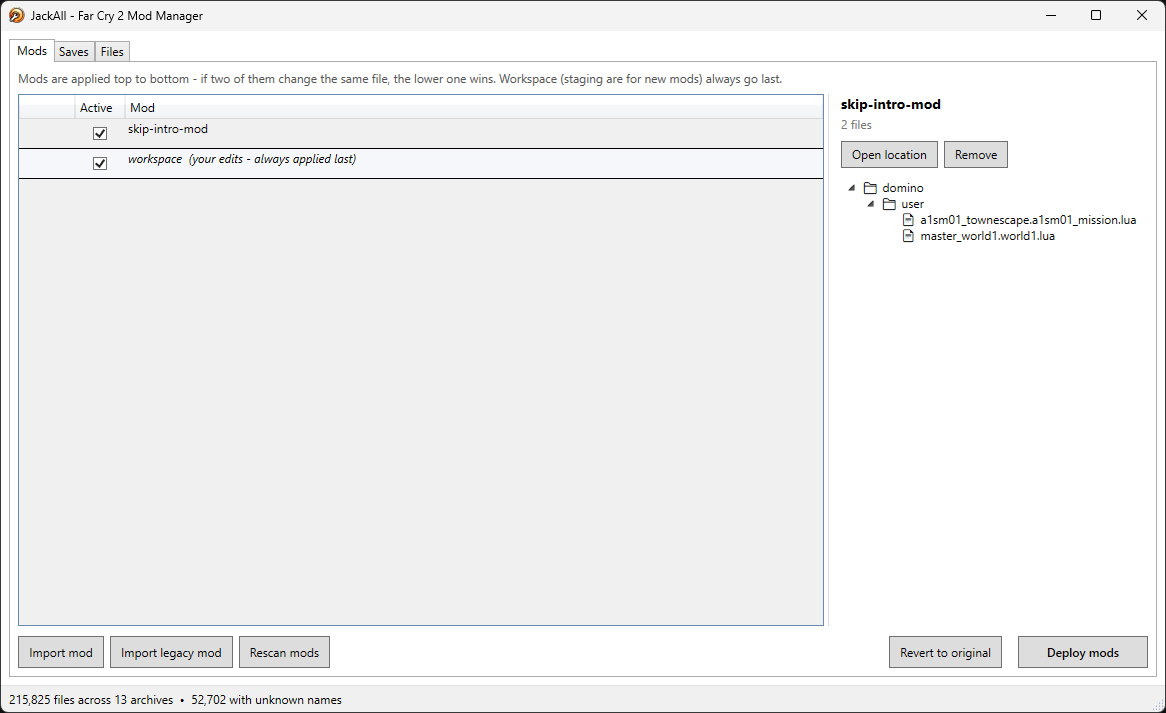
- Mods tab — an ordered list of mod zips, applied top to bottom (later wins). Reorder, enable/ disable, or drop new ones in without touching the game folder itself.
- Workspace — your own edits live in a
workspace\folder, pinned last in the stack and toggleable like any other mod. It's just a tree of relative paths, so it's already a mod zip in waiting. - Files tab — the merged view of all archives exactly as the engine resolves them, with a
"show only mod files" filter and a full-path/
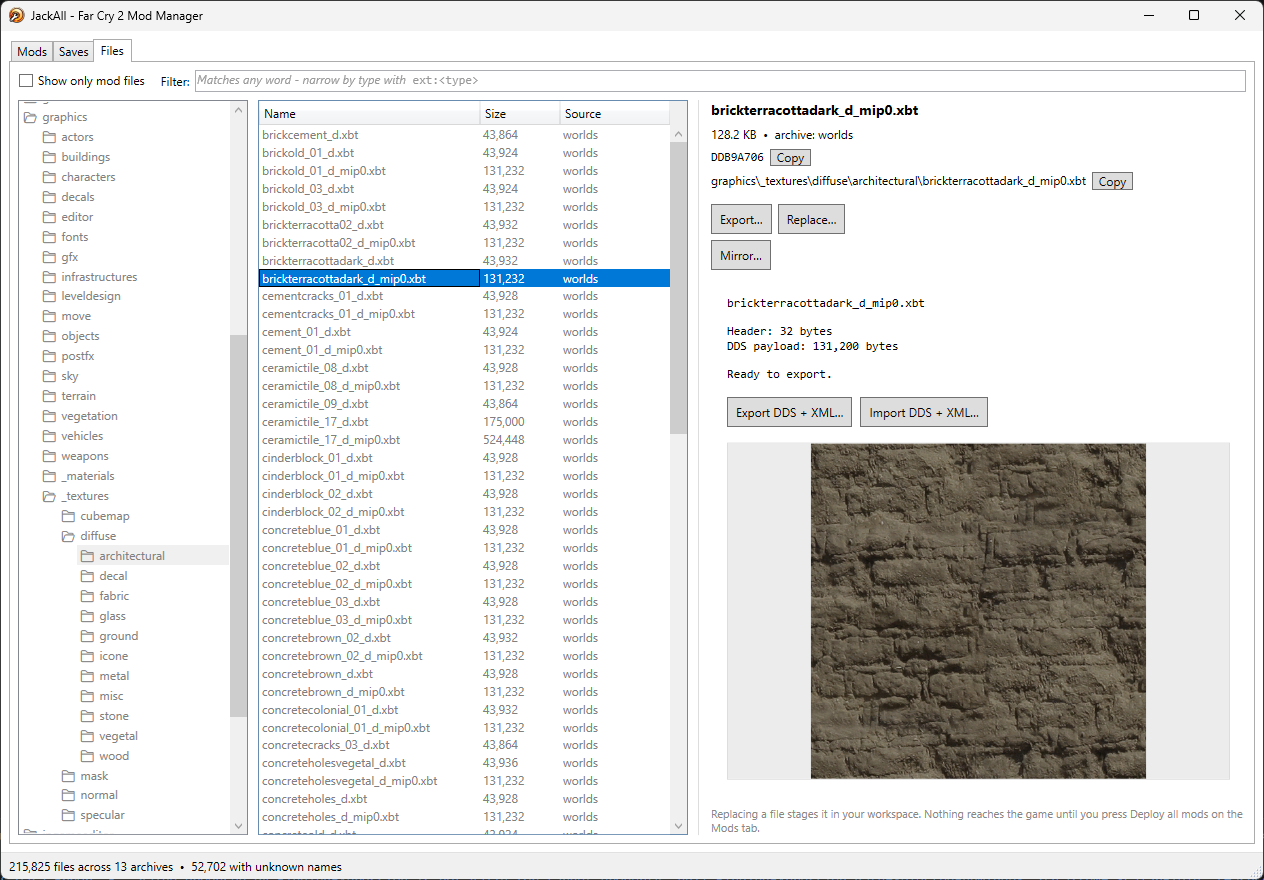
ext:xbt-style search. Anything a mod supplies is highlighted the whole way up the folder tree, so "what have I actually changed" is answerable at a glance without hunting for it. - Legacy mod import — feed it an old-style mod zip that ships a whole replacement
patch.dat/patch.fat(thebuild_patch.batworkflow every existing community mod uses), and it diffs every entry against the true vanilla archive, keeping only what the mod actually changed and staging just that into your workspace — turning a ~200,000-entry haystack into a handful of real edits. - Cross-mod fragment merging — when two enabled mods both touch entries inside the same
.fcbcontainer, JackAll doesn't just let the later one clobber the earlier one's work: each fragment is folded through a three-way merge (ancestor= vanilla, same algorithm asgit merge-file) against the others. A mod that changes a rifle's damage and another that changes a different rifle's clip size in the same file combine automatically; only a genuine overlapping edit surfaces as a conflict, with a clear message telling you which mod and which entry. - Reproducible, safe builds —
patch.datis backed up once, and every build regenerates the patch from that backup, never from whatever happens to be on disk. Building twice yields byte-identical output, disabling a mod and rebuilding genuinely removes it, and a failed build never touches the game (written to a temp file, swapped in only once complete). The read-only base archives (common.dat,worlds.dat, …) are never written at all.
Format support (view, and edit where noted)
| Format | What it does |
|---|---|
.fcb (entities, weapons, vehicles, world sectors) | Decodes to Gibbed-compatible XML, splitting entity libraries into one fragment per entity. Edit the XML, re-import, done. |
.xml / .lua / other text | Syntax-highlighted editor with a trimmed diff-against-vanilla view for anything already modded. |
.rml (resource manifests/localization) | Decode ⇄ edit ⇄ re-encode, same round-trip as .fcb but without the fragment splitting. |
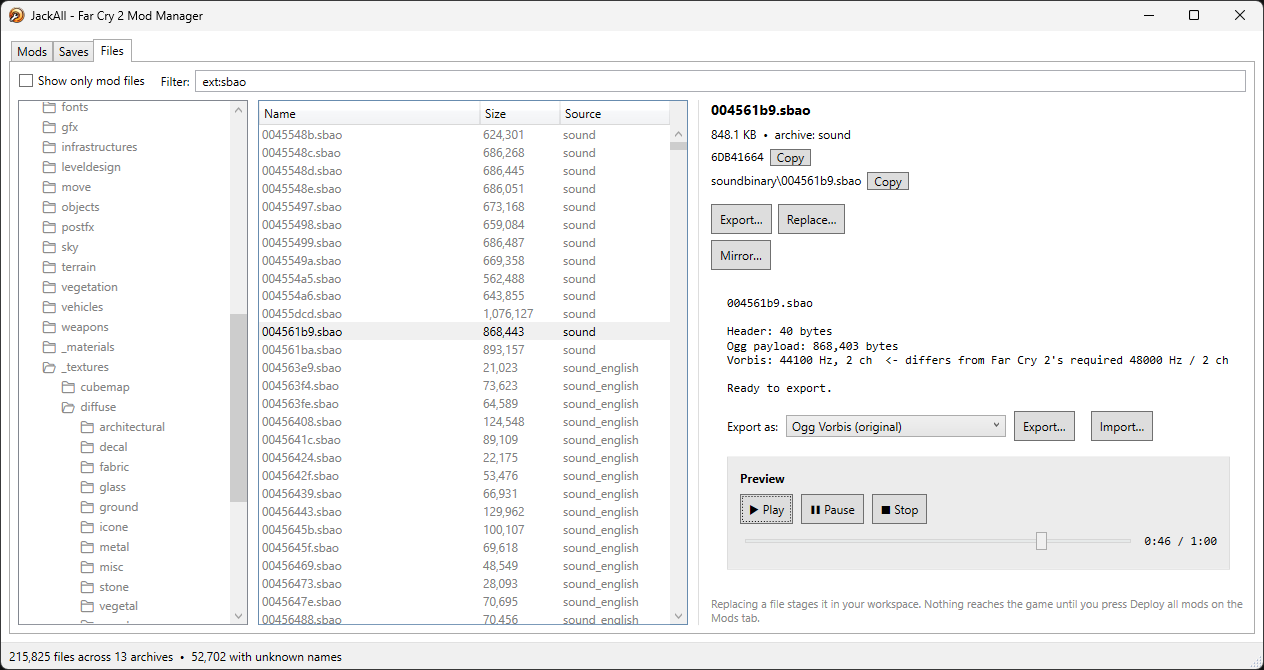
.sbao (music/dialogue audio) | Export as Ogg or MP3; import any ffmpeg-readable audio, auto-transcoded to the engine's required 48 kHz stereo Ogg. |
.xbt (textures) | DDS-backed texture viewer/exporter. |
.xbm (materials) | Shows shader template, every texture slot binding, and every shader parameter. |
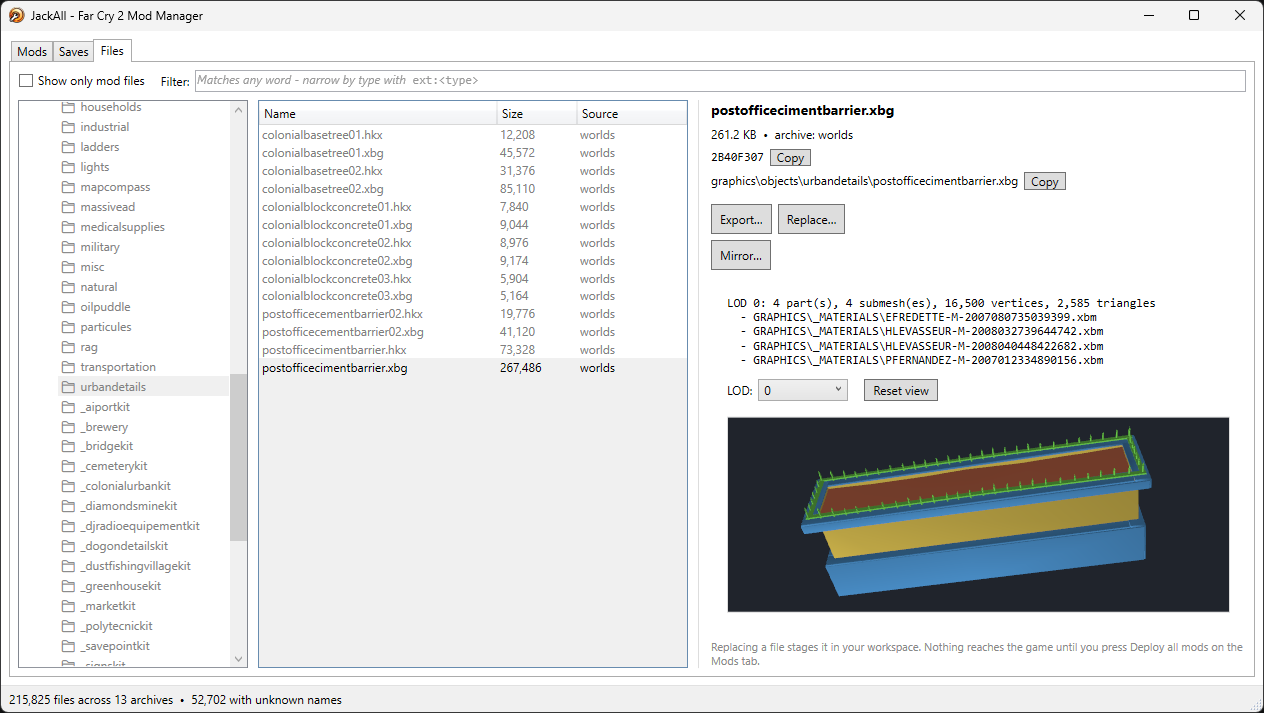
.xbg (3D meshes) | Orbitable 3D preview, per-LOD, per-submesh coloring. |
.sdat (terrain sectors) | Grayscale heightmap viewer. |
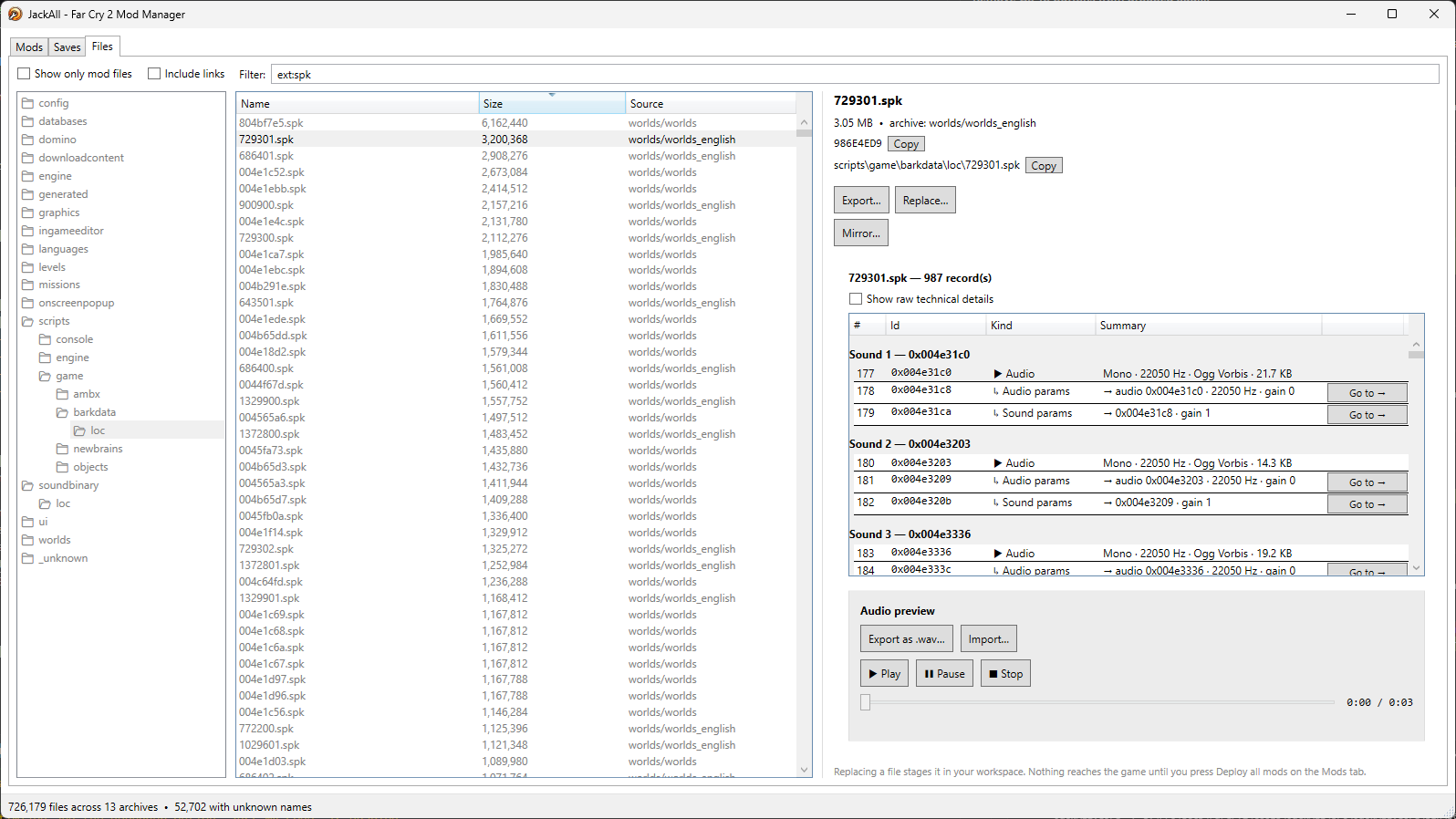
.spk (sound banks) | Structural viewer and replacer (record table, ids, payload sizes). |
.mgb (Magma UI binaries) | Header/type-table and widget/animation tree viewer. |
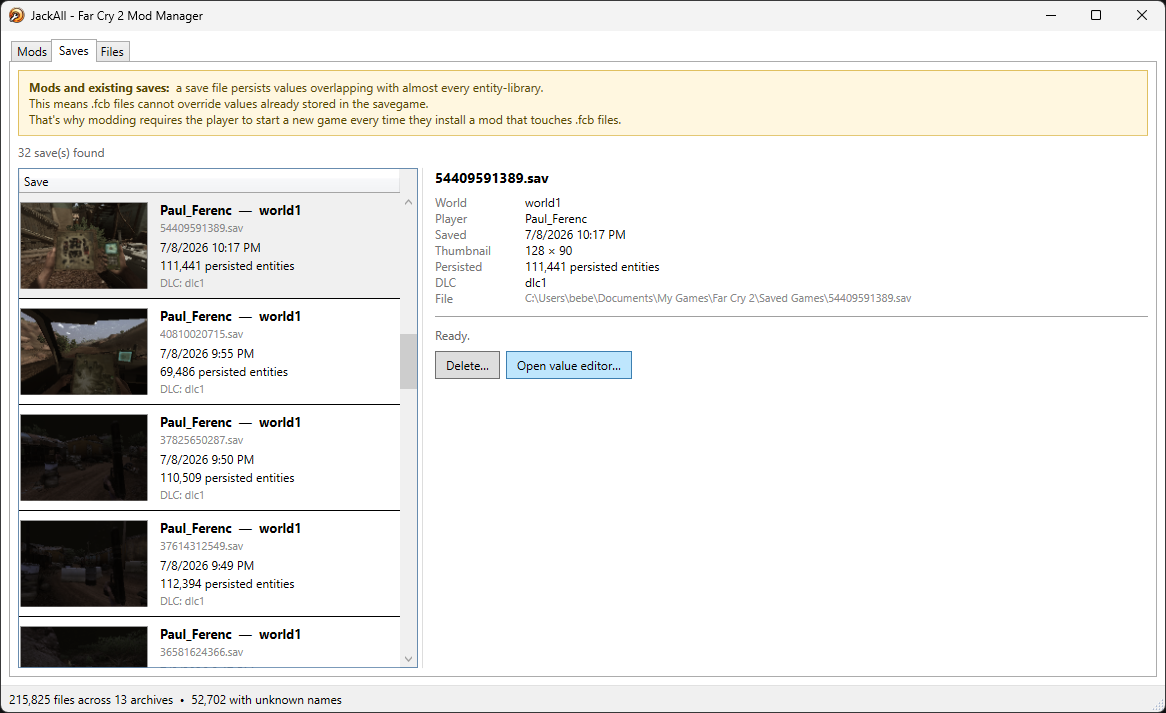
.sav (save games) | Browse world/player/DLC metadata and the persisted-entity tree; delete saves from the same tab. |
Files with no recovered name still show up (extension sniffed from their header, filed under
_unknown\) and are fully editable, staged at their literal hash — nothing is unmoddable just
because nobody's cracked its name yet.
Where it's going
Not a committed roadmap with dates — the actual stated direction the project is trending toward, in the author's own words:
- The mod-installer role transitions to a Vortex game extension. Now built — see
Mod Manager (Vortex). It doesn't reimplement any of this: Vortex handles
downloading, staging, enabling and ordering, and shells out to
jackall-cli mod buildfor the part that actually matters, so the two can't drift apart. - JackAll itself stays — as the file explorer/editor, not the installer. That part of the job moving to Vortex doesn't retire the tool; it narrows what it's for.
- A CLI interface, for faster iteration.
jackall-clinow covers every format conversion (archives,.xbt,.xbg,.sbao,.spk,.fcb,.rml) alongside the hash-list maintenance it started with, plus the whole mod pipeline undermod— see CLI below. - More tooling beyond file editing — for Lua, for 3D — and where a dedicated tool isn't the
right shape for something, tutorials and explanations instead. All of it needs a centralized
home: this repo (
farcry-sdk) for now, eventually a community repo with at least two admins and outside contributors. - Multi-game support via a pluggable core. The plan is to abstract JackAll's view from its core logic so the core becomes a pluggable DLL per game — the same JackAll shell plus a Far Cry 2 DLL today, plus an FC3/4/5/6 DLL later, rather than separate tools per title. That structure is also what would let people collaborate on different games' plugins in one shared repo.
Basic flows
First run
JackAll.exe is a single self-contained file — no .NET runtime install required, just unzip and
run it alongside its config.ini and data\ folder.
Point it at your Far Cry 2 install (needs bin\FarCry2.exe and Data_Win32\patch.fat) — it writes
that path into config.ini next to the exe and hashes the base archives against a known-good 1.03
set, flagging anything mismatched before you start. First launch sniffs every unnamed archive
entry's type, which is the one slow pass; it's cached afterward (data\.appcache) and only redone
if you delete the cache or reinstall the game.
Making an edit
-
Open the Files tab, find the file (folder tree on the left, or search with
ext:fcb foo- style filters). A splitting.fcb(an entity library) shows up as its individual fragments, each pickable on its own: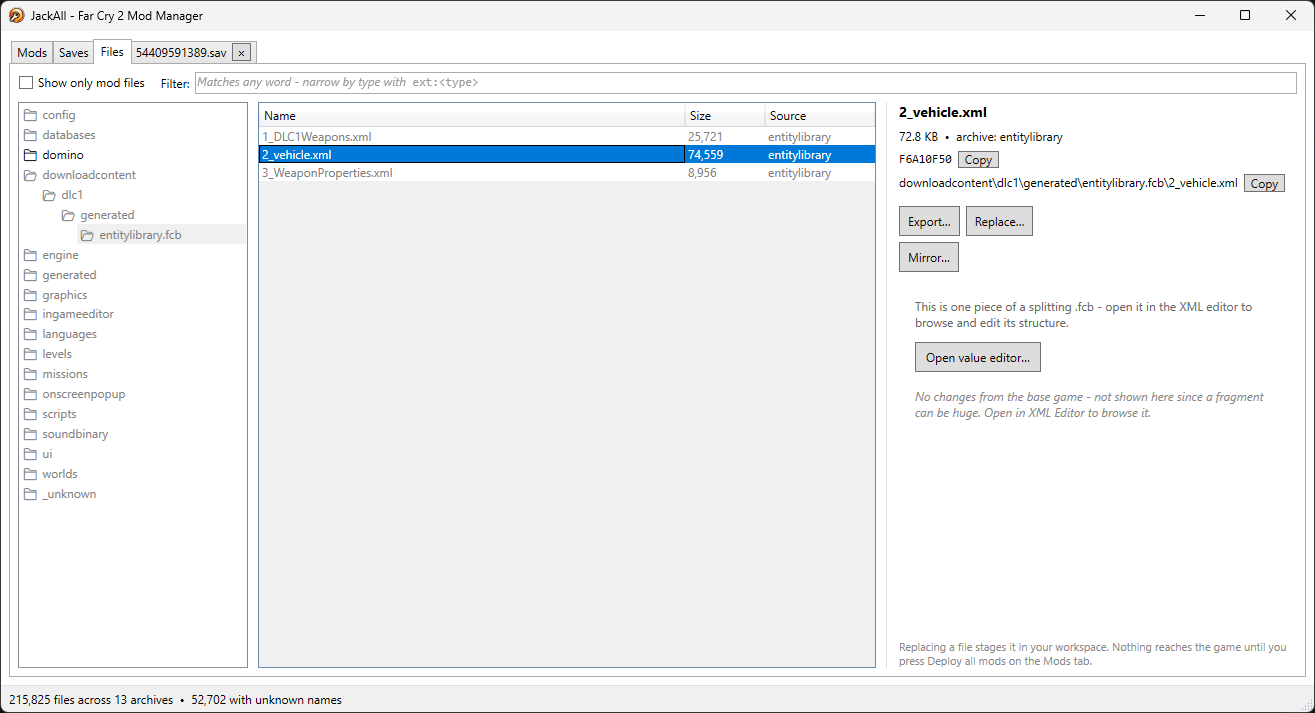
-
Edit it in place — text/XML/Lua opens a syntax-highlighted editor,
.fcbexports to a structured tree/field editor for the entity's whole component graph,.sbaoexports/imports audio, and so on per the format table above: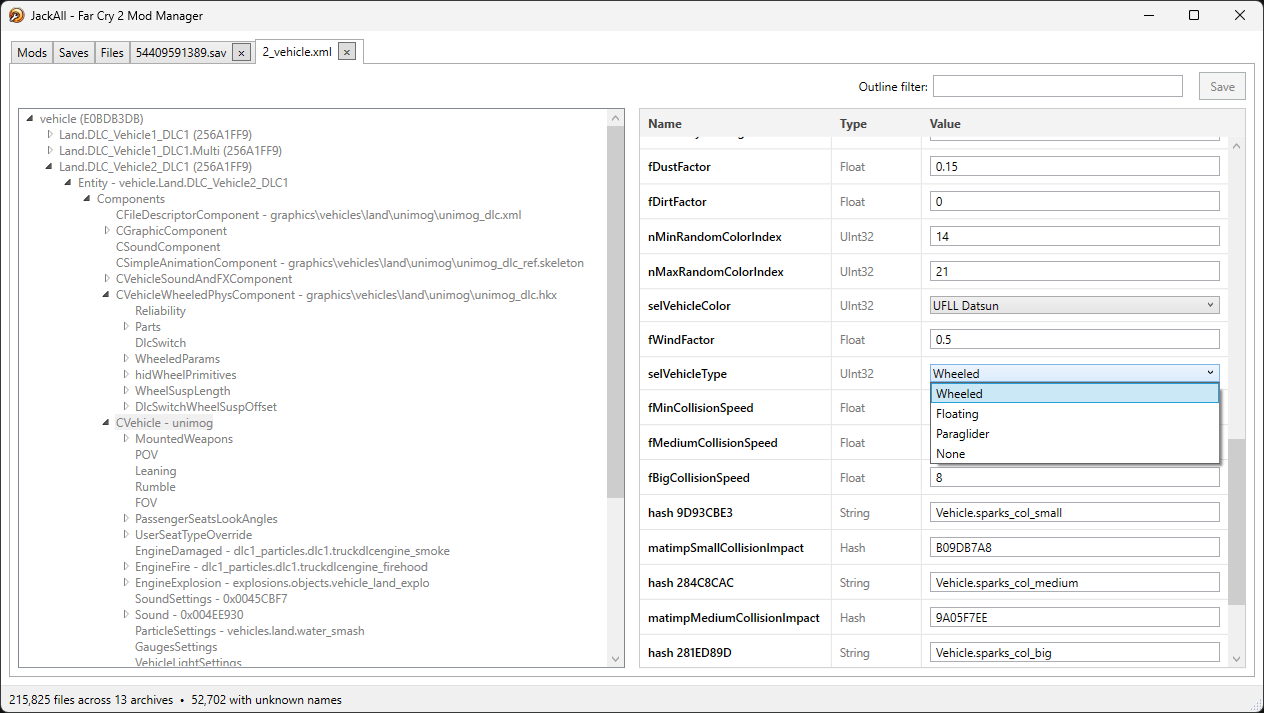
-
Saving stages the replacement into
workspace\automatically — you'll see it highlighted in the Files tab immediately, and the folder path above it lights up too so nested edits are easy to re-find. -
Hit Build to compile the enabled layers into
patch.dat/patch.fat. Rebuilding is always safe — it always starts fresh from the untouched vanilla backup.
Turning your edits into a shareable mod
Your workspace\ folder is a mod, in the same relative-path layout as any archive extract. Once
you're happy with it, zip the folder up — that zip is now an ordinary community mod, droppable into
anyone else's Data_Win32, JackAll or not.
Installing an existing community mod
Use Add mod zip… on the Mods tab. A normal community mod (a plain tree of relative game paths, same shape as unpacking an archive) drops straight in as a new row, inserted above the workspace so your own edits still win last. Reorder rows to change precedence, or disable one without deleting it.
Converting a legacy mod
Most existing FC2 mods were built the old way: a full replacement patch.dat/patch.fat, produced
by build_patch.bat repacking the entire archive whether or not it touched a given entry. Feed
that zip to Import legacy… instead of Add mod zip…, and JackAll diffs every one of its
~200,000-odd entries against the true vanilla original, keeping only genuine differences — .fcb
entity libraries are compared entity-by-entity so a mod that only retuned one rifle stages one small
fragment, not the multi-hundred-KB container it lived in. The result lands directly in your
workspace, reviewable in the Files tab like any other edit, and — same as above — ready to zip and
share once you're happy with it. This is also the practical way to merge two overhaul mods: import
the first as a legacy mod, the second as an ordinary mod zip (or vice versa), enable both, and let
the fragment merge below reconcile anything they both touch.
Tracking what's changed, and combining mods
-
The Files tab's mod highlighting is the change tracker — no separate diff tool needed to answer "what does this mod actually touch." Toggle "show only mod files" to prune the tree down to exactly that.
-
Selecting a modded file shows which mod supplied it and, for text/XML/
.fcb, a trimmed diff against the vanilla original: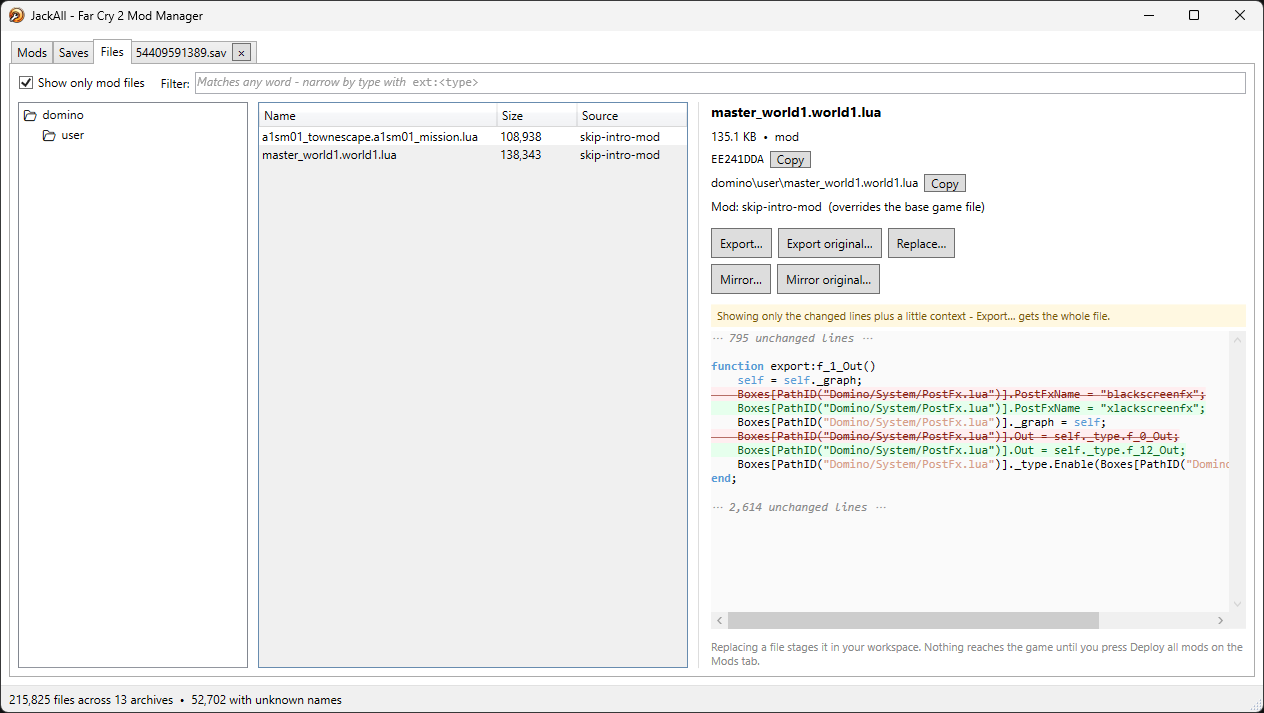
-
When two enabled mods edit the same
.fcbentity, JackAll doesn't silently let the lower one win — it three-way-merges each contributor against the shared vanilla ancestor, the same algorithmgit merge-fileuses. Non-overlapping edits combine automatically. A genuine conflict (both mods changing the same field differently) throws a clear, specific error naming the mod and the entity — hand-fix it by replacing that one file/fragment in your workspace, which always wins outright as the top layer. -
Revert on any file in the Files tab drops just your workspace's own override — a mod zip's contribution is removed by disabling the mod instead, and the base game is never touched, so there's always a clean way back to vanilla.
Browsing and editing save games
The Saves tab lists every .sav in your saved-games folder — thumbnail, world/player name,
persisted-entity count, active DLC, last-write time — and can delete a save straight from there:
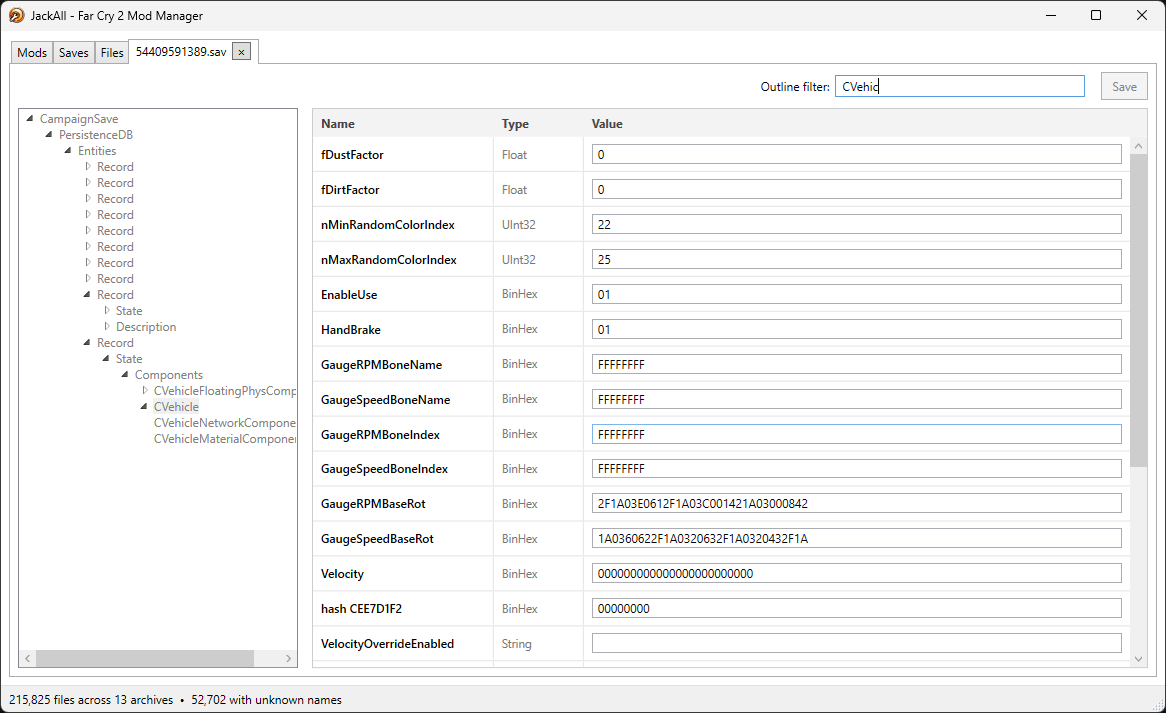
Open value editor… on a save opens its PersistenceDB tree (the same structured tree/field
editor .fcb uses) so you can hand-edit a specific persisted entity's fields directly in an
existing save:
One important gotcha the tool surfaces directly: a save persists values overlapping with almost
every entity library, so a .fcb-based mod's changes can't override what a save already has
baked in. In practice, that means starting a new game after installing (or updating) any mod that
touches .fcb data — an existing save just won't pick the change up.
CLI
jackall-cli.exe is a thin, scriptable sibling to the GUI — same self-contained single-file
publish (no .NET runtime needed), same bundled hash list and .fcb class config. Format
conversions, hash-list maintenance, and the whole mod pipeline.
The mod branch is what the Vortex extension drives, so every one of those
commands also takes --json: exactly one object on stdout, progress on stderr, and
{"ok":false,"error":"…"} with a non-zero exit on failure. Full reference on the
Vortex page.
The extension actually ships jackall-mi.exe, a mod-installer-only build of that same mod branch —
identical output, but ~12 MB instead of ~37 because it drops the asset-format commands and publishes
trimmed. jackall-cli remains the one to reach for by hand, since it has everything.
jackall-cli mod status --game "C:\Games\Far Cry 2"
jackall-cli mod inspect coolmod.zip --game "C:\Games\Far Cry 2"
jackall-cli mod import-legacy --game "C:\Games\Far Cry 2" --from oldmod.zip --out oldmod
jackall-cli mod build --game "C:\Games\Far Cry 2" --layer mods\a --layer mods\b
jackall-cli mod restore --game "C:\Games\Far Cry 2"

jackall-cli system hash archiveitems

jackall-cli archive extract worlds.fat --names

jackall-cli xbt extract texture.xbt
jackall-cli xbt build texture.dds texture.xml

jackall-cli xbg export mesh.xbg

jackall-cli sbao extract music.sbao
jackall-cli sbao build music.ogg music.sbaoheader

jackall-cli spk list 004e1c52.spk
jackall-cli spk extract 004e1c52.spk 0x004e1c50
jackall-cli spk import 004e1c52.spk 0x004e1c50 replacement.wav

jackall-cli fcb decode entitylibrary.fcb
jackall-cli fcb encode entitylibrary/entitylibrary.xml

jackall-cli rml decode toc.rml
jackall-cli rml encode toc.xml
--help on any command or branch (e.g. jackall-cli fcb --help) lists its own options.
A word on intellectual property
JackAll's .fcb/.rml/.fat decoding stands on the shoulders of a decade of community
reverse-engineering — Gibbed's original Dunia tools, wobatt's hash-decoding improvements, and every
forum post and Discord thread that ever pasted a working snippet of format knowledge into the void.
So: to everyone who ever uploaded code, a hex dump, or a "here's how the header works" post that
this tool's understanding of the format ultimately traces back to — thank you for your service, and
also, deepest apologies, your IP has been thoroughly appropriated. Rest assured it was done with
love, a decompiler, and the sincerest form of flattery a modding community can offer.