Tune the AI
The AI tab collects the numbers that decide how soldiers see, shoot and behave: settings on the soldier and weapon archetypes, the curves those settings name, the odds of optional tactics, and the parameters inside the brains. Each of its five sections loads the first time you open it. The example makes one change in each and saves them together.
Soldier, weapon and curve changes save as archetype fragments, the kind of file Your first mod makes. None of this page's changes has been played.
Soldiers
The list has every soldier type the two campaign worlds declare, in groups with the enemies first.
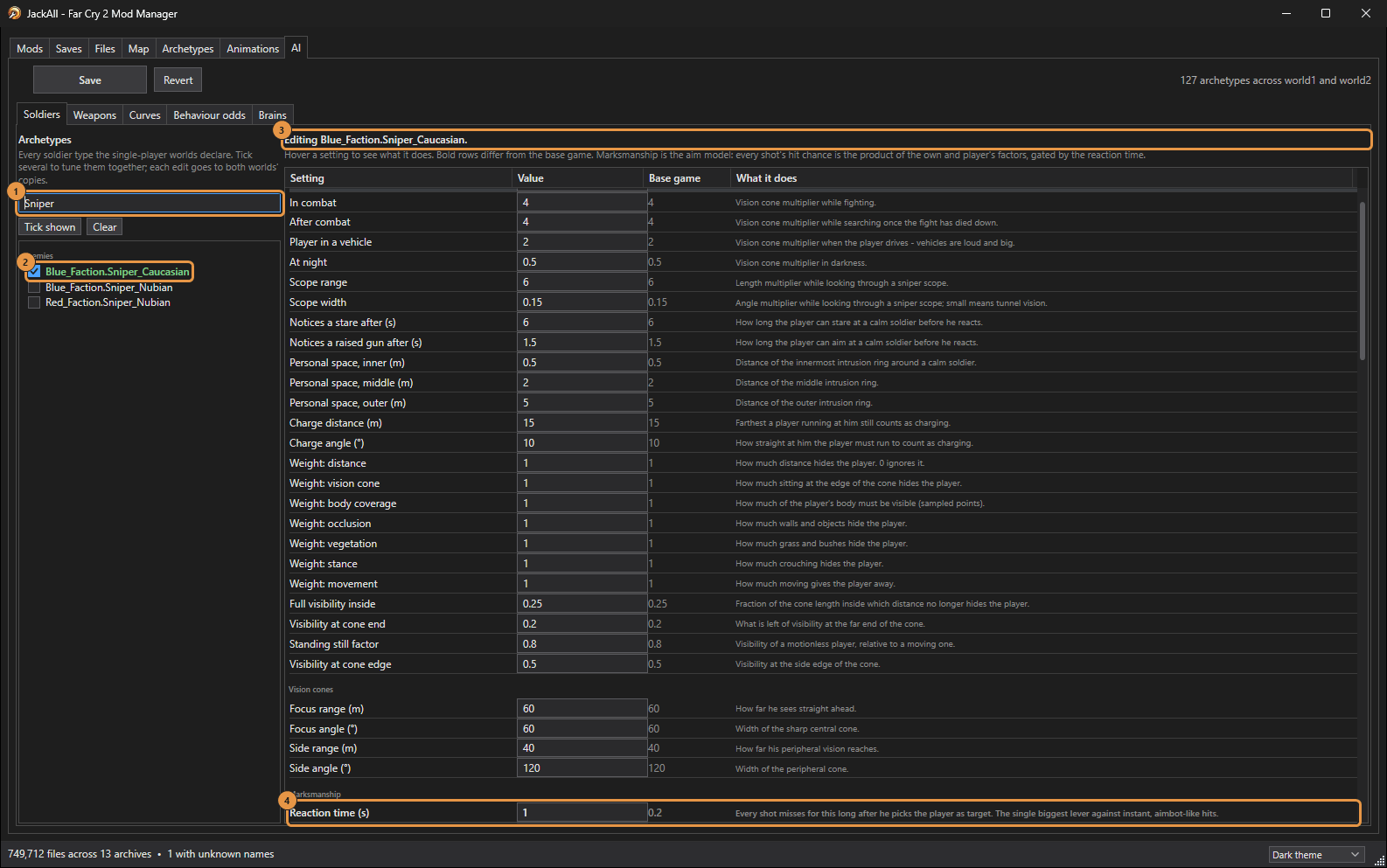
Type into the filter (1), here Sniper, and tick the archetype to change (2); the heading
(3) names it. Its settings are grouped into spotting, vision cones, marksmanship, detection
thresholds, movement, toughness and role, each with the base game's value and what it does. Hover a
setting for the whole text.
Set Reaction time (s) (4) from 0.2 to 1: every shot misses for this long after the soldier
picks you as his target. The row turns bold because it now differs from the base game, and the
archetype turns green in the list. The change goes to the archetype's copy in both world1 and world2.
Tick shown ticks every archetype the filter shows, so that one change reaches them all. The same goes for Weapons.
Weapons
Weapons has the same layout and sets how soldiers fire each weapon; your own gun isn't affected.
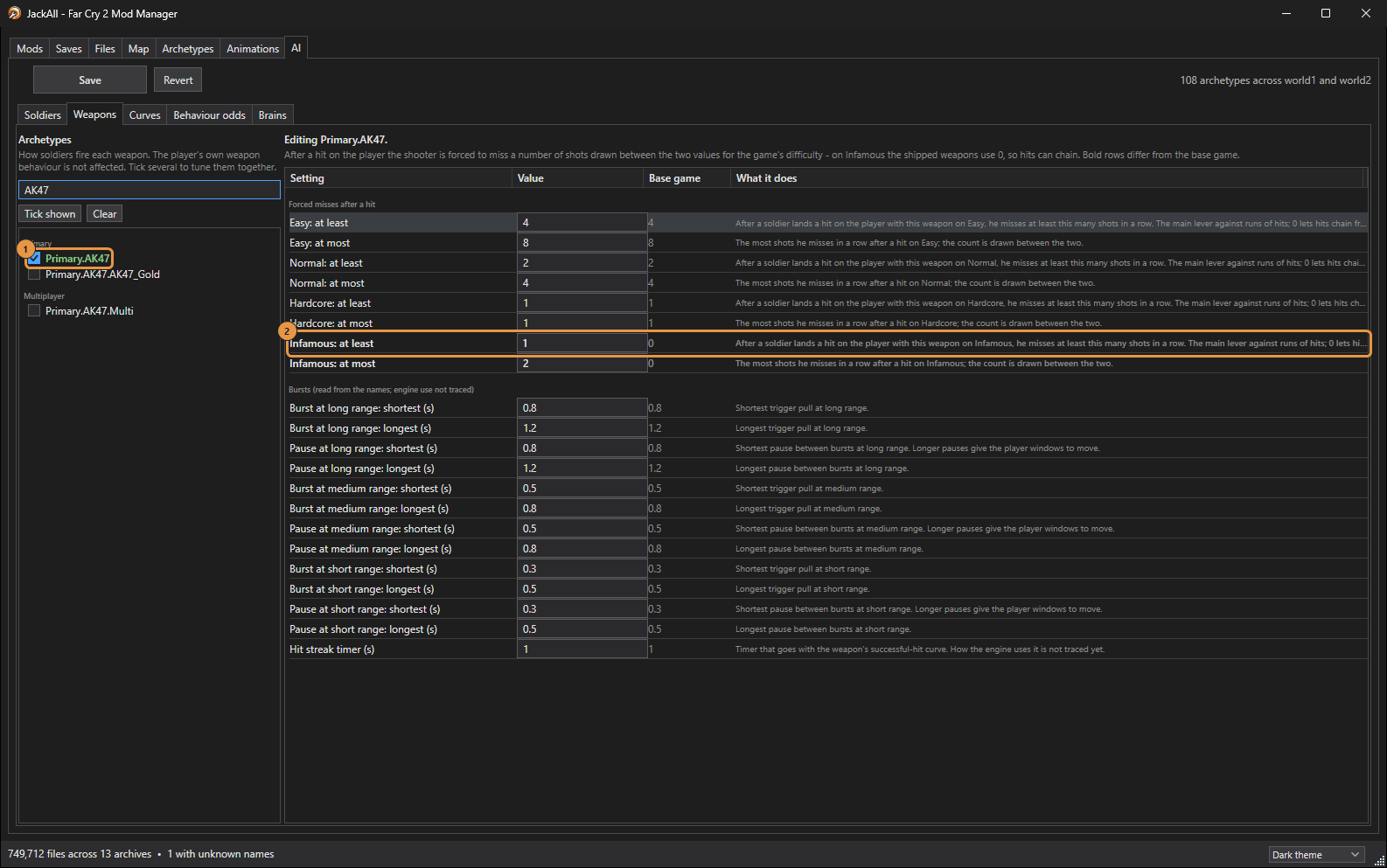
Filter AK47 and tick Primary.AK47 (1).
The Forced misses after a hit rows decide how many shots in a row a soldier misses after he hits
you. The number is drawn between "at least" and "at most" for the difficulty you play on. The AK-47
ships 0 and 0 on Infamous, so hits can follow each other without a break. Set Infamous: at
least (2) to 1 and at most below it to 2.
The burst and pause rows set how long a soldier holds the trigger and waits at each range. As their heading says, how the engine uses them isn't traced yet. Multiplayer copies of a weapon are listed under Multiplayer.
Curves
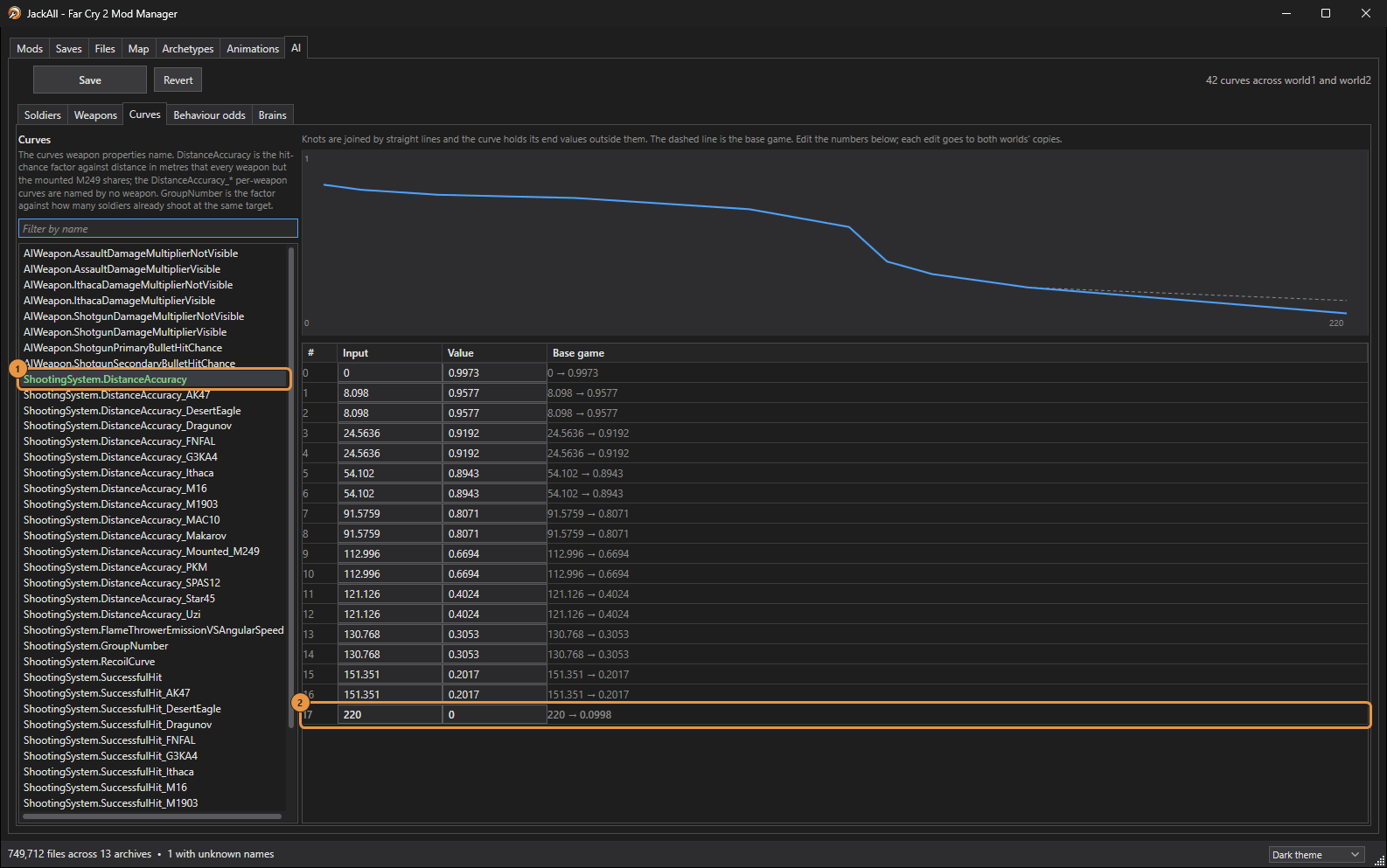
Some settings name a curve instead of holding a number: knots from an input to a value, joined by straight lines. Pick ShootingSystem.DistanceAccuracy (1). It scales a soldier's chance to hit by the distance to his target in metres, and every weapon except the mounted M249 uses it. The chart draws it, with the base game's curve dashed behind.
Change a knot in the table. Set the last one (2), at 220 m, from 0.0998 to 0, and the line now
falls to 0 between 151 m and 220 m.
The DistanceAccuracy_* curves named after a weapon look like per-weapon versions, but no weapon
uses them, so changing one does nothing. Shooting explains how
this factor combines with the others.
Behaviour odds
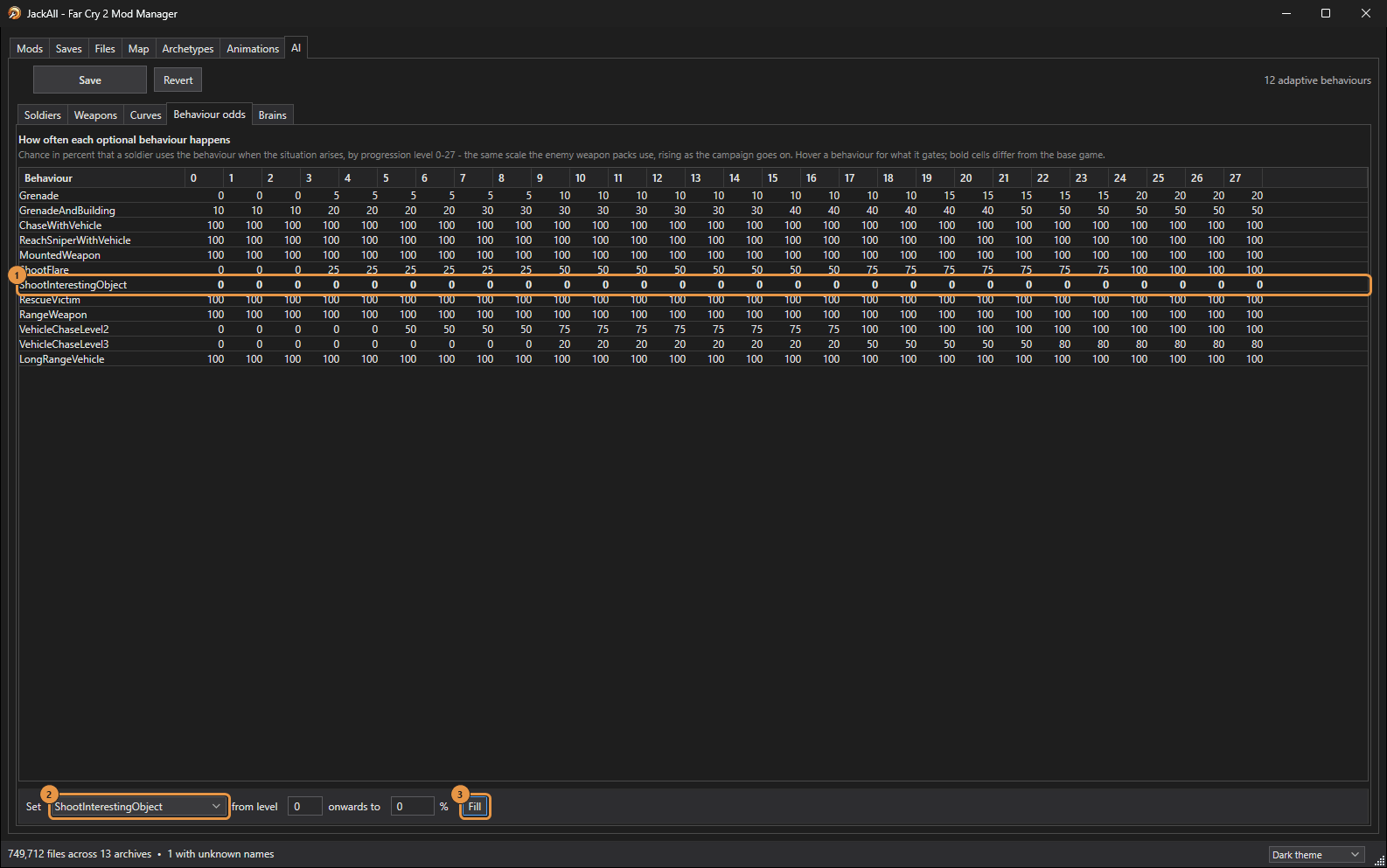
Some tactics are rolled against a percentage: taking a vehicle to chase you, manning a mounted gun, shooting explosive barrels near you. The table has one row per behaviour and one column per progression level from 0 to 27. That level rises as the campaign goes on, and also picks the enemies' weapons. Hover a behaviour to see what it gates. Five of the twelve are read by no brain, and the hover text says so.
The bar at the bottom sets a whole row from one level on. Pick ShootInterestingObject (2), from
level 0 onwards to 0 %, and click Fill (3). The row (1) turns to zeros, in bold because it
differs from the base game.
Brains
A brain is a soldier's decision tree, an AI workspace in scripts\game\newbrains\. mercbrain
drives every soldier and opens first; the Brain drop-down has the others, for animals,
vehicles and buddies among them. The tree on the left goes brain → "when state" → plans →
tasks.
The search box (1) finds a node by name or class. Search Wait2Sec and pick the one under
GunHandling (2). The heading says what its class, CTaskWait, does, and the table lists its
parameters with the base game's values. Set timeToWait (3) from 2 to 5.
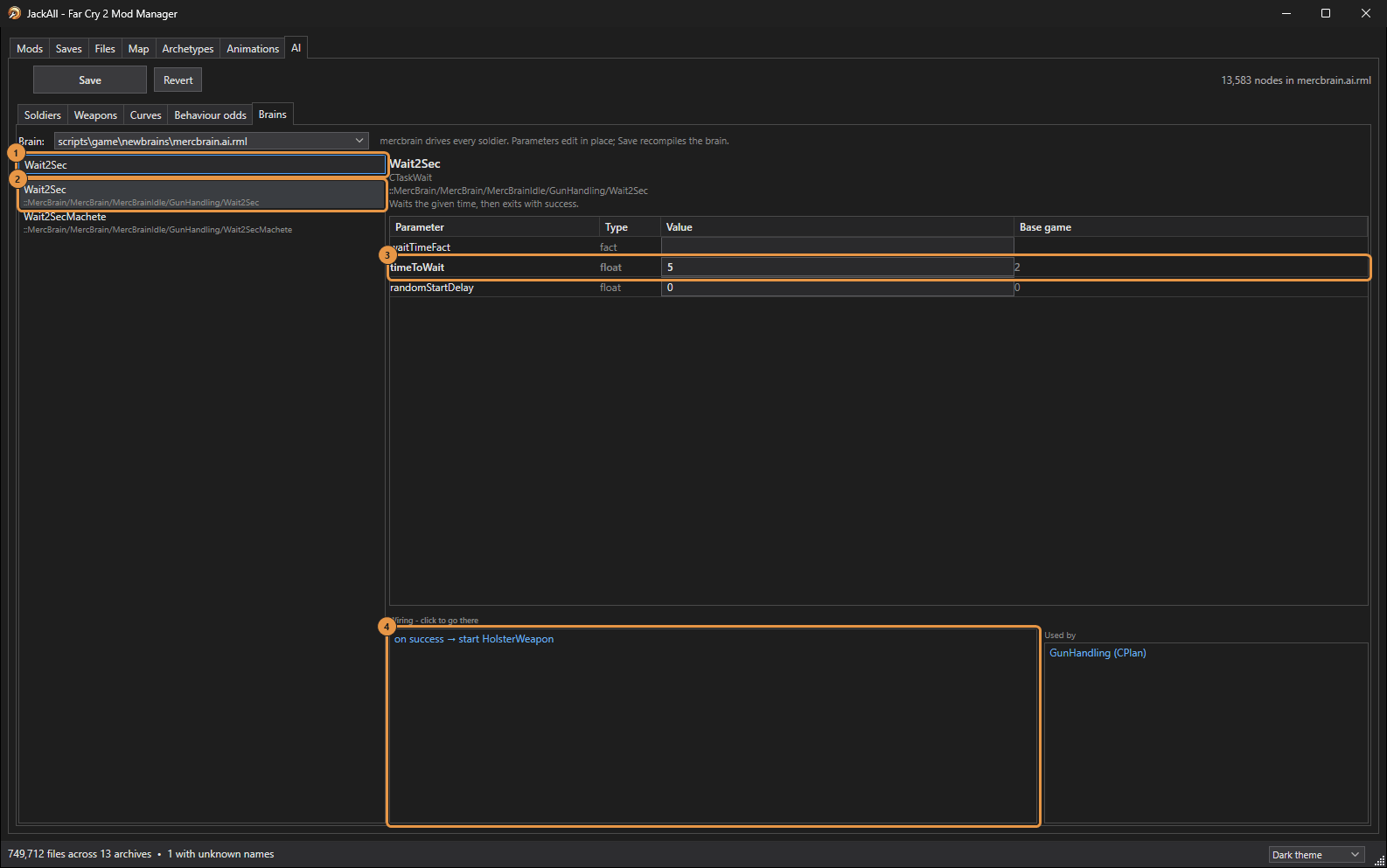
Wiring (4) shows what the task starts next, here HolsterWeapon once the wait succeeds. Click
a line to go to that node; Used by lists the plans that run this one. A parameter whose name is
struck through is one the task never reads, so the game ignores it.
Save
Save at the top stages every section's changes at once, and the status line beside it says what it staged: "Staged 1 archetype(s), 1 archetype(s), 1 curve(s), behaviour odds, mercbrain.ai.rml into the workspace". That's the sniper, the AK-47, the curve and two whole files:
| Section | Saved as |
|---|---|
| Soldiers, Weapons, Curves | a fragment per archetype in each world's entitylibrary.fcb |
| Behaviour odds | engine\gamemodes\gamemodesconfig.xml |
| Brains | the brain's .ai.rml, recompiled |
Revert throws away the changes since the last save. Then Deploy mods.
AI describes how the engine uses all of this, and
.ai.rml the brain format.