Finding any file
The Files tab shows every file of the game's 13 archives as one folder tree, the way the game itself sees them: when two archives have the same file, you see the one the game loads. Most modding starts here, with a question like "where is the AK-47's texture?".
This page only looks at files.
Search
Type into Filter (1). Every word you type has to appear in the name, and four prefixes narrow it down:
| Word | Keeps | Example |
|---|---|---|
ext:<type> | files of one type | ext:xbt for textures |
arch:<archive> | files from one archive, as the Source column (3) names it | arch:patch |
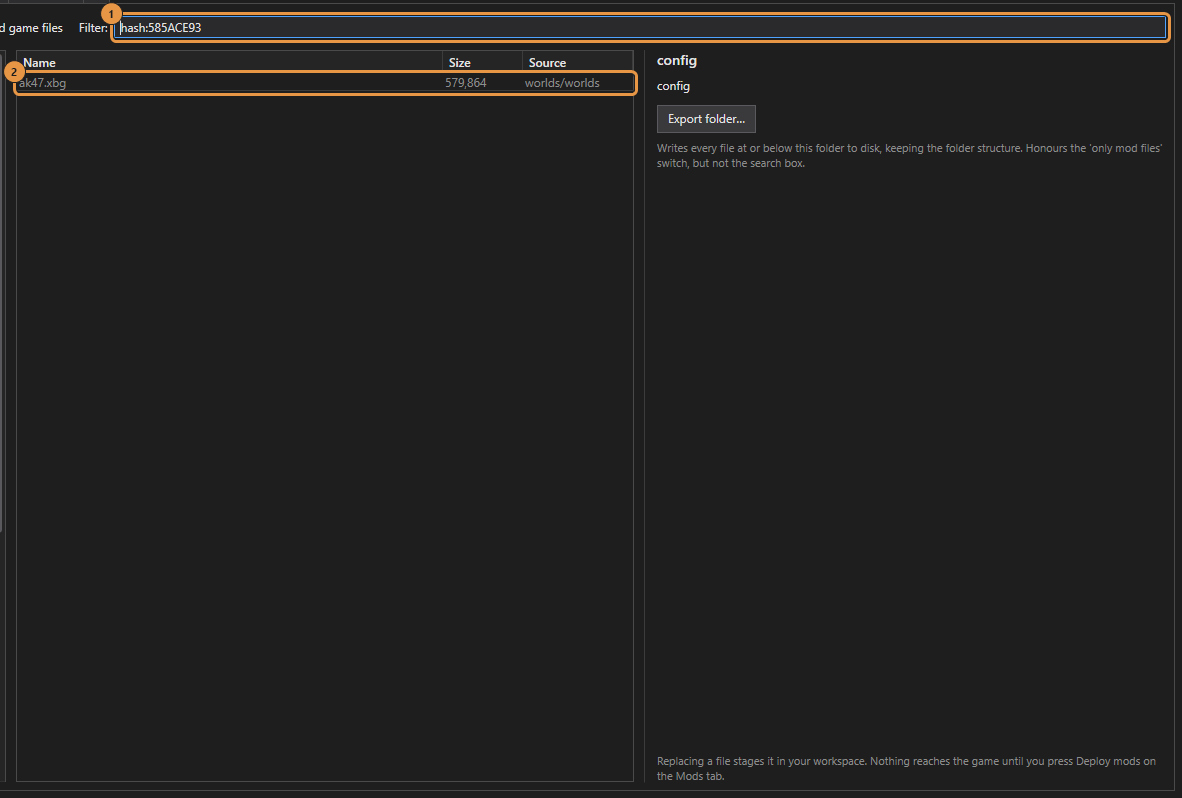
hash:<hex> | the file with this hash | hash:585ACE93 |
tag:<word> or tag:"<word> <word>" | models, textures, sounds and shaders whose tags match every word | tag:"kitchen interior" |
ext:xbt ak47 finds the AK-47's textures (2), across every folder.
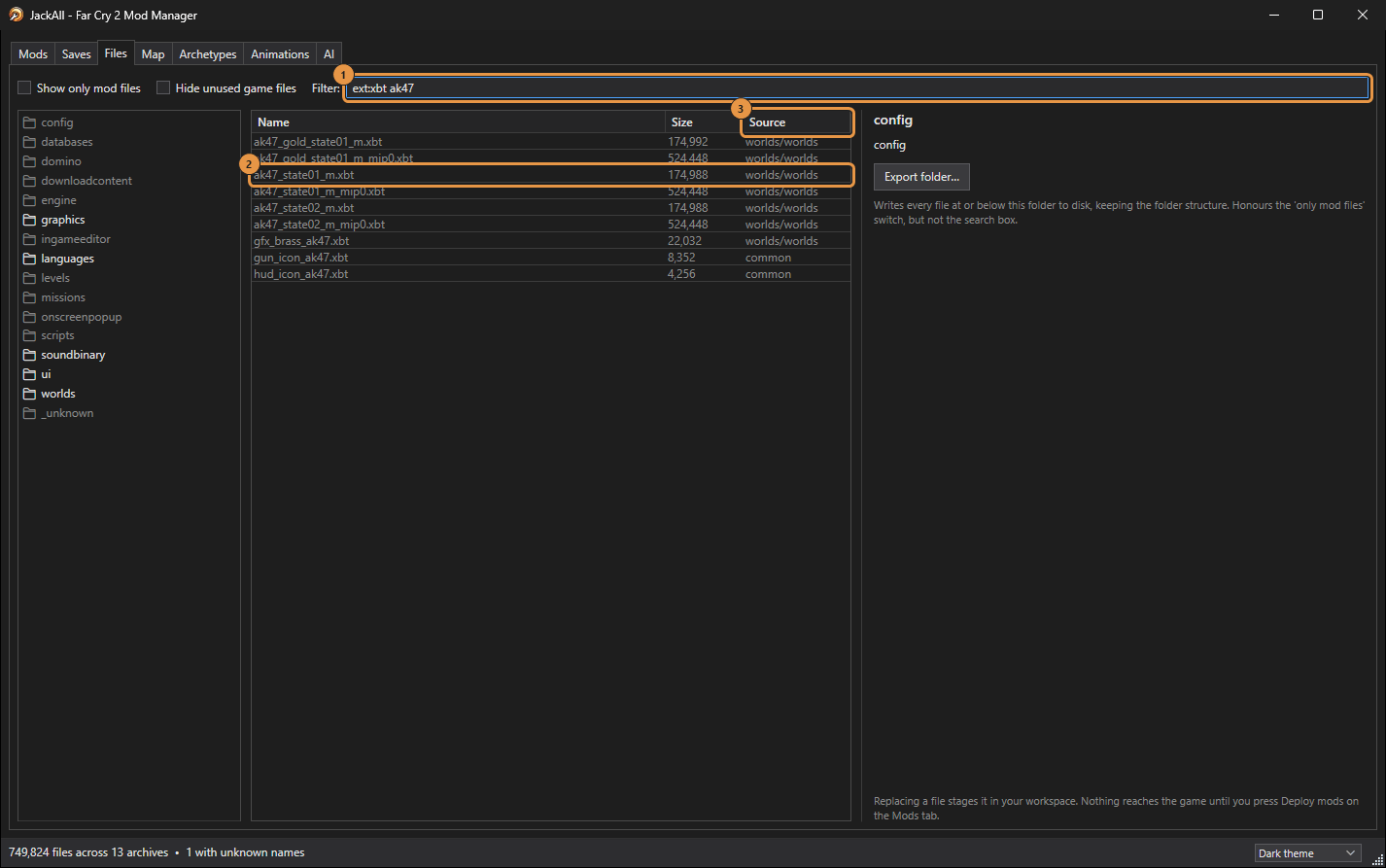
Or browse: the tree on the left is the folder structure, and clicking a folder lists its files.
What a file's details tell you
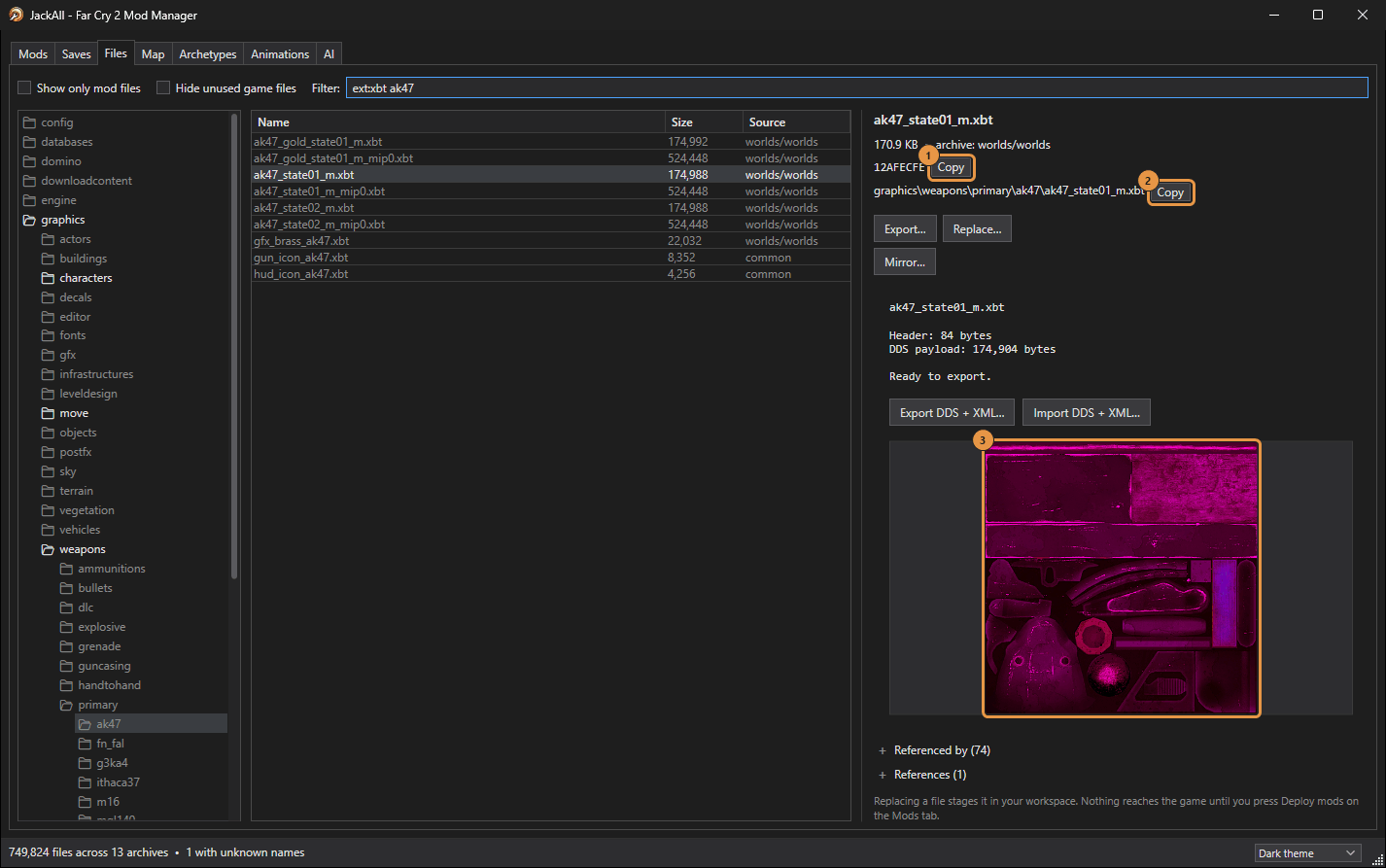
Click a file. On the right you get its size, the archive it comes from, and two things worth copying: its hash (1) and its path (2). The game finds files by the hash of their path, so when a forum post, a crash log or another file mentions a hash, this is how you match it up. Below are the buttons to export or replace the file, and a preview (3) for most file types.
Searching by hash: (1) goes the other way: it finds the one file (2) behind a hash you have.
Only what mods change
Tick Show only mod files (1) and the tree (3) and the list keep only what your enabled mods and your workspace change. The Source column then says which mod each file comes from (2). Here, with VSS Vintorez enabled, it's the two icons the mod replaces.
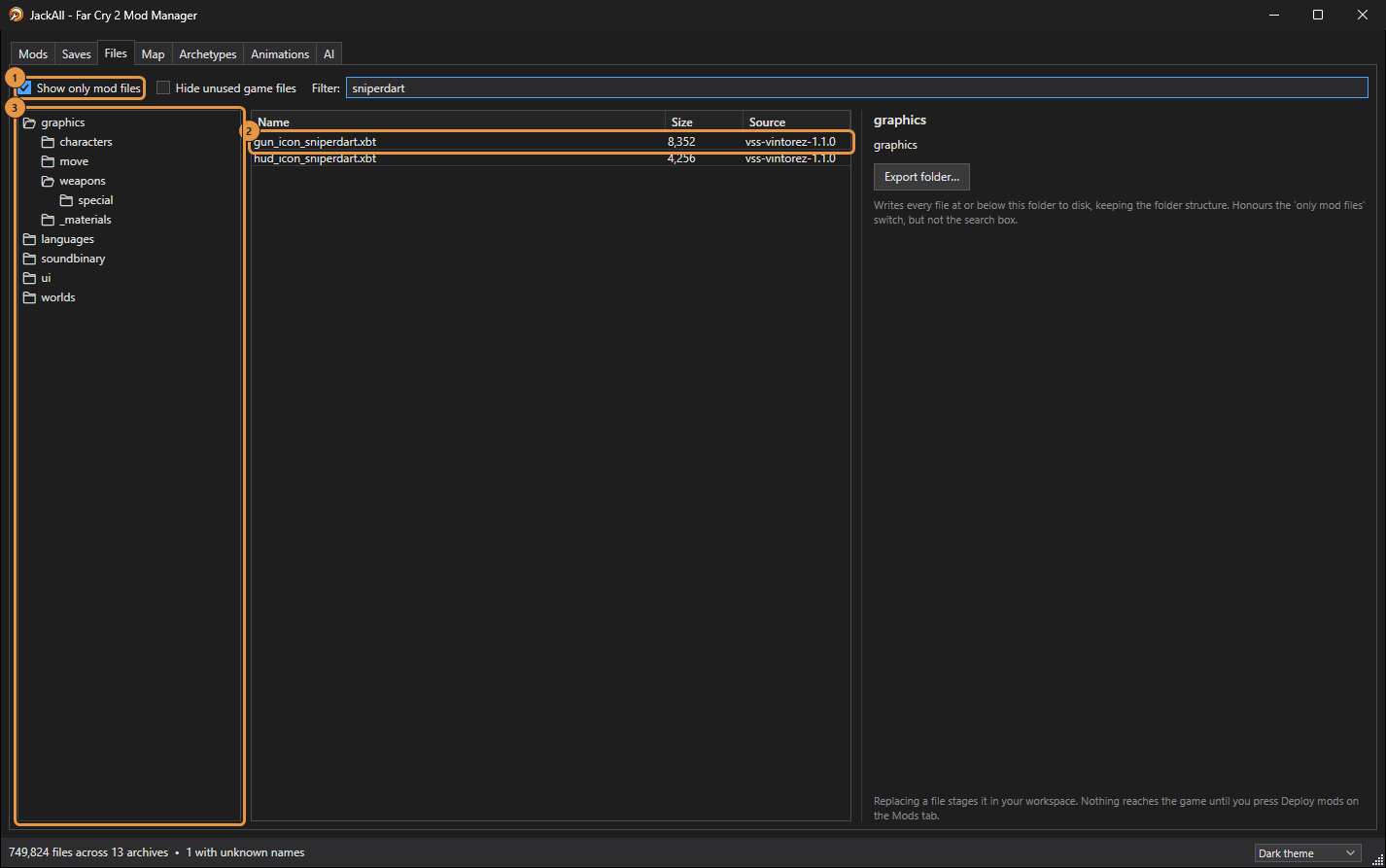
Without the checkbox, changed files still stand out: they're drawn in full white, while files no mod touches are grey.
Files the game never reads
Not everything in the archives is used. There are leftovers from the PlayStation 3 and Xbox 360 versions, files only Ubisoft's editor used, and an unfinished development world. JackAll knows which ones the PC game never opens: they're in italics (1), and selecting one shows a warning saying why (2). Editing one of them does nothing in game, however long you spend on it.
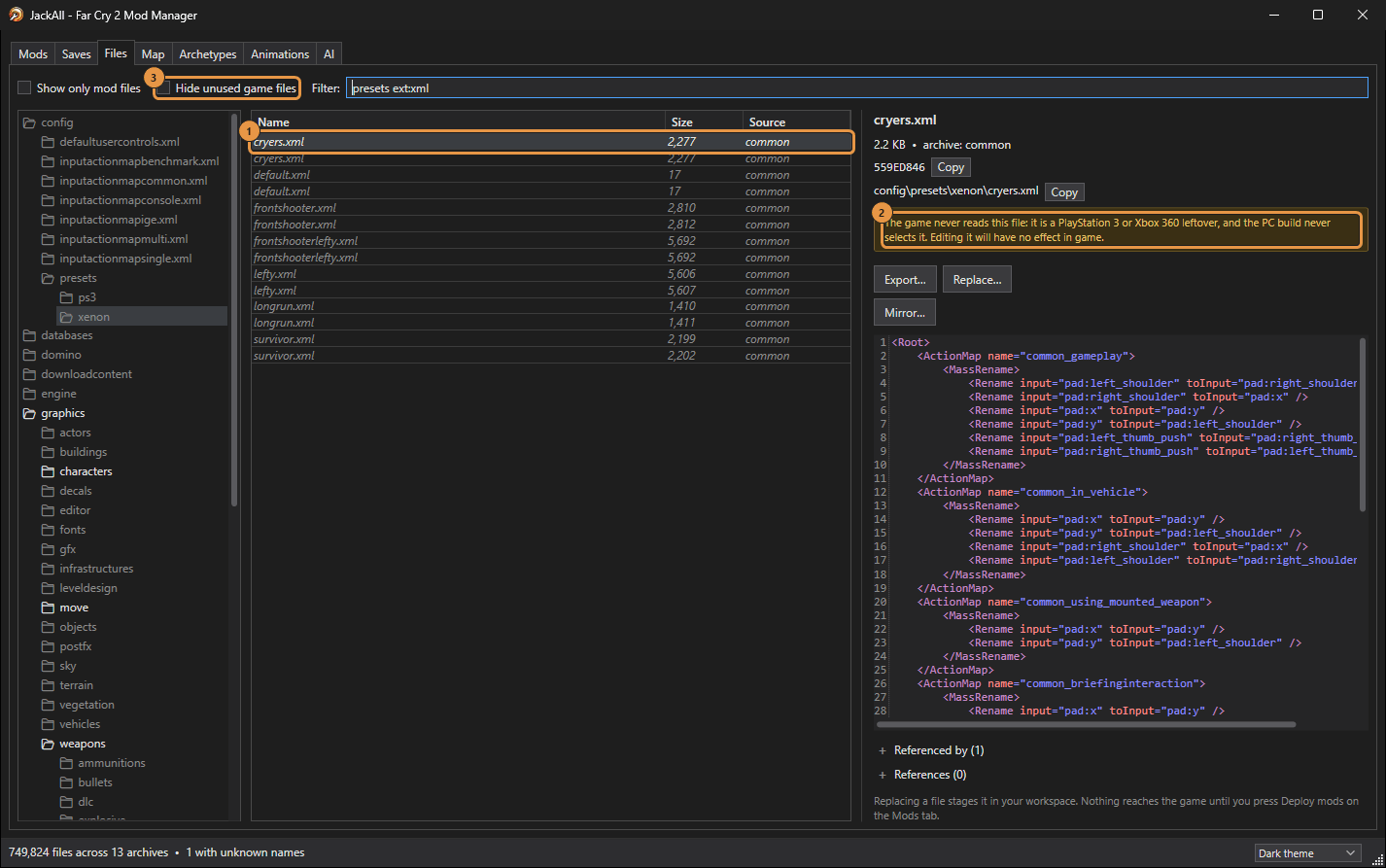
Tick Hide unused game files (3) to leave them out of the tree and the list altogether. Your own edits are never hidden.
Tags
Every model, texture, sound bank and shader object of the game is tagged by what it is and where it
belongs: a kind (furniture, container, material, ambience, foliage), a few words saying what
it is, and tags for the places, rooms, settings, materials and condition it fits, such as
home kitchen interior wood, or for a shader the quality presets that draw it. The Label column
shows the kind, then for a sound or shader the detail of its label (below) and for a model or
texture its description. Selecting one also shows its tags. The full list of kinds and tags is in
the repository's tools/asset-tags/README.md.
tag: searches them. A word that is a kind or a tag matches only the files that carry it, so
tag:war finds the props of a battlefield and not warehouses. Any other word matches part of the
description, the tags or the label, so a half-typed word already finds something. With the other
words, tag:"kitchen interior" ext:xbg lists the models for a kitchen.
Sound labels
Sound banks are named by number (soundbinary\004b27c7.spk), so JackAll labels each one by where the
game uses it. A label is a category and a detail:
| Category | Example detail |
|---|---|
weapon | reload, 1st person (ak47), from the AK-47's reload animation |
vehicle | suspension heavy (JeepWrangler, …), from the vehicles' archetypes |
dialogue | Michele, BMD: "The APR men found out! - I’m surrounded! Where are you?!", the speaker and the subtitle |
impact | materialimpact switch (Objects.Box_wood_1), from the material impact table |
The other categories are explosion, foley, voice, animal, object, ambience, music,
ui, effect and scene (a cutscene's sounds), with other for a sound only a mission script
plays. A bank no game file names but another bank plays, such as a shot's audio, takes the label of
the sound that plays it. Recorded speech without a subtitle is just dialogue.
So tag:"ak47 reload" in Filter finds the AK-47's reload sounds, and tag:"dialogue Flora"
finds Flora's lines. The 37 retail banks nothing in the game's files names are labelled by hand; most
of them play only silence.
Shader labels
Compiled shaders are named by number too (engine\shaders\obj\h0f\shadernumber_fc7bd88f.pso).
JackAll labels each Direct3D 9 one by the shaders that load it and the graphics quality that draws it.
The label reads: what it draws, the shader, its passes, the options it is built with, and the quality
presets that use it, such as
weapon · mesh_weapon · lit by spot · QUALITYLOW, receives shadows · no preset.
The first word is one of:
| Category | Shaders |
|---|---|
foliage | grass, tree leaves and trunks |
ground | terrain, roads, decals |
weapon | weapons |
characters | skin, hair, cloth |
vehicles | vehicles |
world meshes | buildings, props and other models |
sky | sky dome, clouds, sun and moon, stars |
water | lakes, rivers |
effects | particles and post effects |
engine | depth and render-state passes, debug drawing |
An object several of these share is shared. The presets are the game's graphics quality presets,
Low to Ultra High: low, medium, high, veryhigh and ultrahigh, or all presets. no preset
means only a custom mix of settings draws it, such as low textures with shadows on.
The category is a shader's kind, in the word models and textures use for the same thing: vehicles
is vehicle, characters character, foliage vegetation, ground terrain, effects fx,
and world meshes is world-meshes. Each preset that draws it is a tag: all presets gives all
five, no preset the tag no-preset. So tag:"weapon high" finds the weapon shaders the High preset
draws, tag:"weapon QUALITYHIGH", matching the label, the ones high textures use, and tag:vehicle
the vehicles' models, sounds and shaders together.