Add a font
Far Cry 2 writes all of its text in two fonts, Farcry2_25 and arial_cyrillic_25, and it can't
read a TrueType file. A font in the game is a Magma font: an .mft file of glyph metrics beside
pages of glyphs already drawn, as .xbt textures. Make a font draws one from any TrueType or
OpenType file.
The example is Caveat, a handwriting font from Google Fonts, at weight 600 and 40 px. The Inventory Overhaul's notebook writes its missions, notes and captions in it.
Caveat staged this way draws in game, in the Inventory Overhaul's notebook.
1. Open Make a font
On the Mods tab, click Make a font (1).

2. Pick the font
Click Browse… and pick a .ttf, .otf or .ttc file.
- Font (1) lists every font the file holds: each font of a collection, and each named style of a variable font.
- A variable font also gets a slider for each of its design axes, such as Weight (2), for the values between its named styles. Caveat comes in Regular and Bold; 600 is between the two.
- Size (3) is the pixel size the glyphs are drawn at. The game's own fonts are 25.
- Name (4) is what the game knows the font by. It starts as the family and the size.
The preview sets the sample text from the pages the font will ship with, spaced the way the game spaces it. Edit the sample to try your own text. Under it are the number of characters drawn and the game's characters the file lacks, which draw as nothing: Caveat has no Greek.
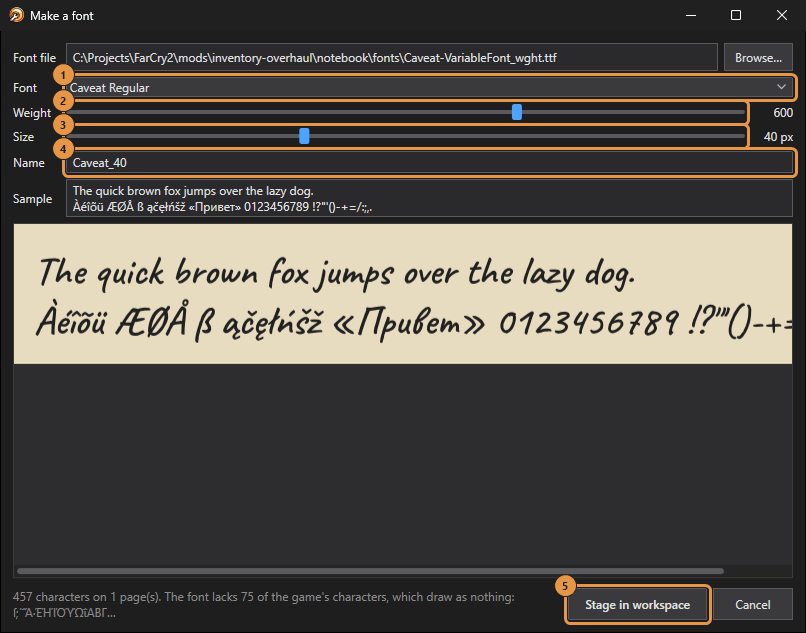
Click Stage in workspace (5).
3. What gets staged
ui\fonts\caveat_40.mft, and its page,ui\fonts\caveat_40_0.xbt.- In every
fonts.mgb, one per language and screen shape, the font and a font family of the same name:_fonts.xmland_fontfamilies.xml. - In every UI dependency list,
ui\localized\<aspect>\<lang>\ui\_depload.xml, the font's files as dependencies offonts.mgb.desc. The game opens a UI file only once it has preloaded it, so a font this list doesn't name draws nothing.
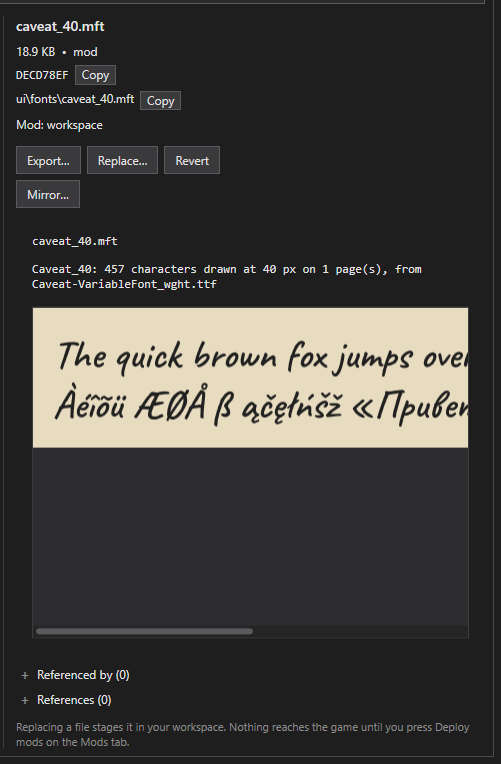
The packages and lists are fragments, so another mod's fonts merge with yours. The staged font is on
the Files tab under ui\fonts\, set from its own page:
4. Write in it
A Text element draws in the family its FONTFAMILY names. Export the package's XML with
Export XML… in the MGB editor, name the font in the text's family:
<FONTFAMILY present="true" id="Caveat_40" PACKAGE="\fonts.mgb" />
and import it again with Import XML…. The text's HEIGHT is the size it is drawn at, so the
font is scaled to it. Draw the font at about the largest height you'll set; scaled up, it blurs.
Then Deploy mods.
On the command line, jackall-cli mft build does all of this; see
Convert game files on the command line. The format is described in
mft.