Containers and fragments
Some of Far Cry 2's files hold hundreds of separate things. World1's entity library has every
weapon, vehicle and character of the first map; the text table has every line of text the game
shows; hud.mgb has every part of the HUD. A mod that ships such a file whole also ships the
original of everything it didn't touch, and the next mod that ships the same file replaces it. Two
of those mods can't be used together.
JackAll treats these files as containers and each thing in them as a fragment. A mod ships only the fragments it changes, and Deploy mods puts them into the game's own file. Mods that change different fragments of one file all work, and mods that change different values of the same fragment are merged.
VSS Vintorez and the Flashlight mod are made of fragments of entity libraries, the animation graph, a dependency list, input maps, the HUD and the text table, and both were played.
What it looks like
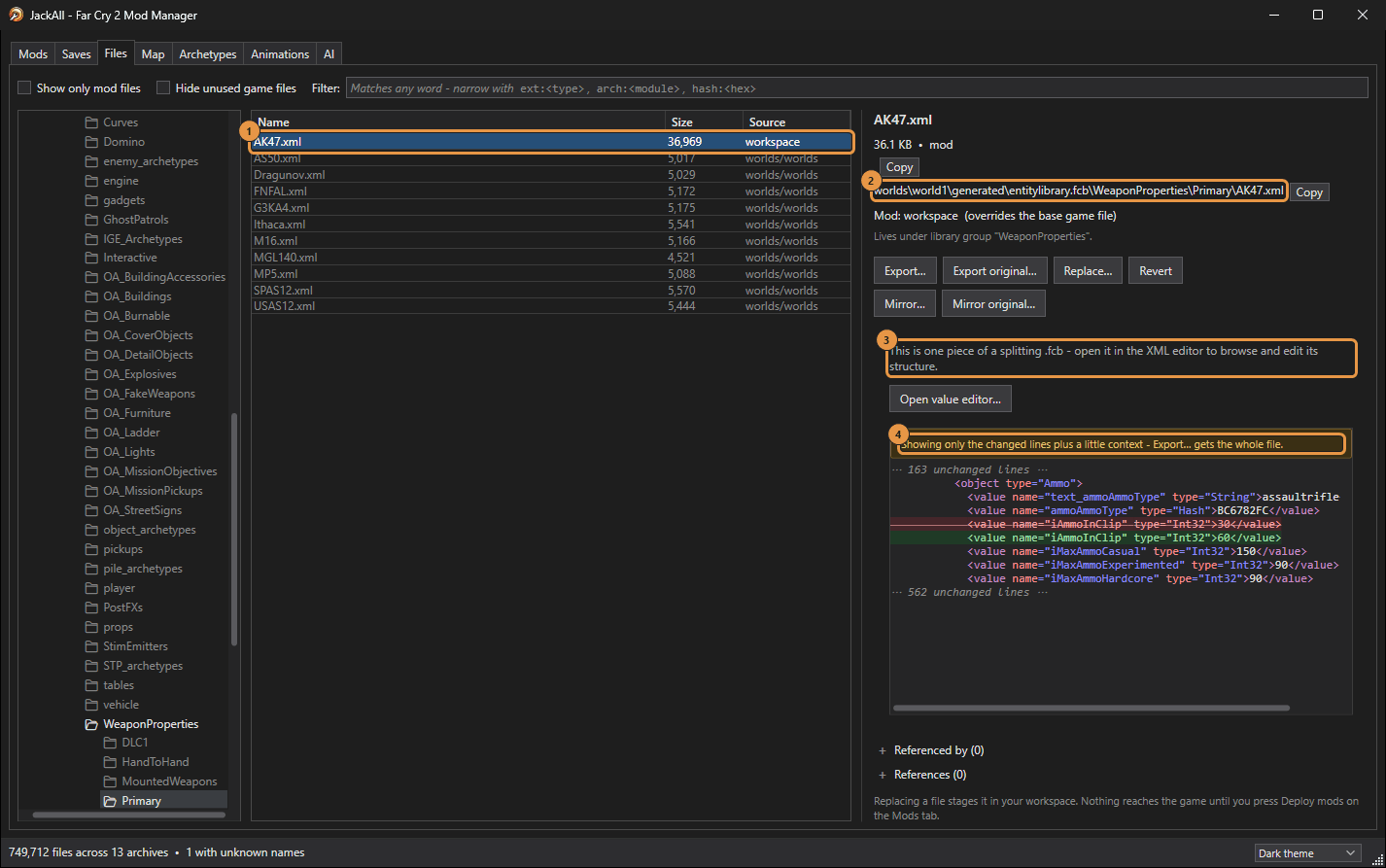
On the Files tab a container opens like a folder, and its fragments are listed like files. Here the AK-47 from Your first mod (1) is one fragment of world1's entity library: its path is the container's path, then the archetype's name (2). The details say it's one piece of a splitting file (3), and the preview shows only the line you changed (4), although the fragment holds the whole archetype.
A mod's zip is laid out the same way. This is the Flashlight mod:
mods\config\defaultusercontrols.xml\CATEGORY_MISC.xml          one category of the controls
mods\config\inputactionmapcommon.xml\common_gameplay.xml      one action map
mods\languages\english\oasisstrings.fragment.xml             its strings, one file per language
mods\ui\localized\pc\eng\ui\hud.mgb\a_flashlight_object.1092050190.xml   one area of the HUD
mods\ui\localized\pc\eng\ui\hud.mgb\_materials.xml           the HUD's list of textures
mods\ui\localized\pc\eng\ui\_depload.xml\hud.mgb.desc.1430943848.xml   what the HUD preloads
mods\ui\textures\hud\flashlight_hud_off.xbt                   a whole file
mods\soundbinary\00fa0000.spk                                 a whole file
plugins\flashlight\Flashlight.dll                             an FCSE plugin
Every other HUD package the game ships, one per language and screen shape, gets the same hud.mgb
and _depload.xml fragments. None of the controls files, text tables, HUD packages or dependency
lists it changes is in it whole, so it works next to any other mod that changes other parts of them.
Which files are containers
| File | One fragment is | Example from a mod |
|---|---|---|
Entity libraries: worlds\<world>\generated\entitylibrary.fcb, generated\entitylibrarypatchoverride.fcb and the DLC's | One archetype | mods\worlds\world1\generated\entitylibrary.fcb\WeaponProperties\Special\Dart_Rifle.xml |
World sectors, …\worldsectors\worldsector<N>.data.fcb, and a world's omnis, managers and mapsdata | One object placed in the world | mods\levels\w1_c_4\generated\worldsectors\worldsector3331.data.fcb\land.jeepliberty_0.2054243731923553576.xml |
Dependency lists, <world>_depload.dat | One resource and everything it loads with it | mods\worlds\world1\generated\world1_depload.dat\dragunov.3882209901.xml |
UI dependency lists, ui\localized\<aspect>\<lang>\ui\_depload.xml | One UI package and everything the game preloads with it | mods\ui\localized\pc\eng\ui\_depload.xml\hud.mgb.desc.1430943848.xml |
The animation graphs, graphics\move\movemgr.bin and dlc1.bin | One situation, or one weapon's rules in it | mods\graphics\move\movemgr.bin\Pawn_Generic_Reload_ch17_w39.1920121392.xml |
The text table, languages\<language>\oasisstrings.rml | One string | mods\languages\english\oasisstrings.fragment.xml; see The text table |
World descriptors, <world>.game.xml | One mission, or one section such as the environment | mods\worlds\world1\generated\world1.game.xml\_environment.xml |
Controls, config\inputactionmap*.xml and config\defaultusercontrols.xml | One action map or category | mods\config\inputactionmapcommon.xml\common_gameplay.xml |
Menus and the HUD, .mgb | One area, plus the package's lists of materials, fonts, font families, strings and exports | mods\ui\localized\pc\eng\ui\hud.mgb\a_flashlight_object.1092050190.xml |
AI brains, scripts\game\newbrains\*.ai.rml | One brain, plan, scanner or task. A plan lists the tasks it owns, so a mod adding a task also ships its plan | mods\scripts\game\newbrains\mercbrain.ai.rml\LauncherInHand.3303724464.xml |
The game modes config, engine\gamemodes\gamemodesconfig.xml | One block of game settings, such as the muzzle light or the hit locations, or one game mode | mods\engine\gamemodes\gamemodesconfig.xml\DefaultMuzzleFlashManager.xml |
The pawn state machines, *.gosm.xml | One group, state or track, by its FullName. A mod ships the whole group with its change; two mods adding to one group both land | mods\scripts\engine\objects\pawn\statemachine\weapons.gosm.xml\__Pawn Weapons_Weapon Mechanics_States_AllowWeaponSwitch.xml |
Particle libraries, <world>_deploadnewparticles.rml | One particle effect | mods\worlds\world1\generated\world1_deploadnewparticles.rml\weapons.weapons.pl_muzzleflash_ak47.483129128.xml |
Everything else ships whole: textures, sounds, music, models, animation clips, terrain, Lua scripts,
and the other .fcb and .xml files. When two mods ship the same whole file, the lowest
one in the list wins.
How a fragment is named
JackAll writes fragments for you, so this matters when you write one by hand or look inside a mod's zip.
- The container's path becomes a folder under
mods\, and the fragment's name follows it. - Upper or lower case doesn't matter.
- An archetype's folders are its name.
WeaponProperties.Primary.AK47isWeaponProperties\Primary\AK47.xml. The same file in another folder is another archetype, a new one. A mission in a world descriptor works the same way. - Placed objects, dependency entries, animation situations, HUD areas and particle effects are
named by the number before
.xml. The text in front of it is only a label:land.jeepliberty_0.2054243731923553576.xmland2054243731923553576.xmlare the same jeep. These files sit directly in the container's folder, not in folders of their own. - The rest go by their name: a controls section such as
common_gameplay.xml, a block of the game modes config such asDefaultMuzzleFlashManager.xml, a game mode asGameMode.Single.xml, and the fixed names that start with_, such as_materials.xml,_fonts.xml,_environment.xmland_layout.xml.
What a fragment holds
A fragment holds the whole piece: the whole archetype, the whole HUD area, the resource with all of its dependencies. It doesn't hold only the lines you changed. When mods are combined, JackAll compares each fragment with the game's own version of that piece to find what the mod changed, so the parts it left alone don't count. A mod that ships the whole AK-47 to change its magazine doesn't undo another mod's change to the AK-47's damage.
The text table is the exception: there you list only the strings you change.
How mods combine
For each fragment, JackAll starts from the game's own version and goes through the mods in load order, comparing each with the original:
- Different fragments of one file all land.
- Different values in the same fragment all land.
- The same value changed to the same thing is fine.
- The same value changed to different things is a conflict. The later mod's value wins and the deploy names the conflict, unless your workspace sets that value too: your workspace's value settles it. With Stop on conflicts ticked, Deploy mods stops there instead. See When two mods conflict. The Files tab shows the later mod's value.
- Two mods adding the same new fragment with different contents is a conflict too.
- Items added to the same list, such as dependencies of one resource, are all kept.
Because a value that matches the game's own counts as unchanged, a later mod can't put a value back to the original over an earlier mod's change, and neither can your workspace. Untick the earlier mod instead.
Whole files and fragments together
- Two mods ship the same whole file: the lowest in the list wins.
- One ships the whole file, another ships fragments of it: the fragments are applied on top of the whole file, whatever the order. Where both change the same piece, the fragment wins, and Deploy mods and the command line both say so.
- The text table can't be shipped whole. A mod with a whole
oasisstrings.rmlis refused.
So an old mod that ships a whole entity library still works, but it replaces every other whole copy and gives way to every fragment. Import legacy mod turns such a mod into fragments; see Import an old patch.dat mod.
Adding and removing
A fragment the game doesn't have is added: a new archetype goes into the library group its name
starts with, and a new object into the main mission layer.
A fragment can change or add a piece, but not remove one. To delete placed objects or archetypes, a
mod lists them in the container's _layout.xml, which the Map tab writes when you delete something.
The same file moves objects between mission layers. If another mod changes an object you delete,
the deploy keeps the object and says so; with Stop on conflicts ticked, Deploy mods stops
and asks you to drop one of the two.
Where fragments come from
| When you… | JackAll saves |
|---|---|
| Save in the value editor or on the Archetypes tab | The archetype or object you edited |
| Save on the Map tab | The objects you moved or added, the sector's _layout.xml, archetypes you pasted from the other world, and the dependency entries they need |
| Save in the MGB editor | The areas that differ from what the game loads now; an area put back to the original is removed again |
| Save on the Animations tab | The situations you changed |
| Save on the AI tab | Soldier, weapon and curve archetypes; a brain as the plans and tasks that differ; behaviour odds as their block of the game modes config |
| Make a font on the Mods tab | The font and its family in every fonts.mgb, and its files in every UI dependency list; see Add a font |
| Import legacy mod | Every piece of every container the old mod changed |
You can also write a fragment by hand: copy one into your workspace with Mirror on the Files tab,
edit it, and click Rescan mods. On the command line, mgb fragments, move fragments,
ai fragments, depload add --fragment and mft build write them; see
Convert game files on the command line.
The text table
Text is written differently. One fragment is one string, and you list your strings together in one
file next to the table, mods\languages\<language>\oasisstrings.fragment.xml:
<oasisstrings>
  <section name="Items">
    <string enum="ak47" value="AK-47 Drum" />
  </section>
</oasisstrings>
Each language has its own table, so a mod that changes text for everyone needs one file per language, as Flashlight has. Rename a weapon walks through one.
Getting the most out of it
- Save through JackAll. The value editor and the other tabs save fragments. Import XML… on a whole file saves a whole file, which gives up the merging.
- Ship what JackAll wrote. Zip your workspace's folders as they are; see Package and share your mod.
- Leave out what you didn't change. An unchanged fragment changes nothing, but JackAll still rebuilds its whole container for it. Revert on the Files tab takes it out of your workspace.
- Check archetypes. A fragment of an archetype that a later library declares again does nothing. Check for dead edits on the Mods tab finds them; see Which copy does the game read?