Installing mods with JackAll
Mods like Sky Overhaul, Sound Overhaul and VSS Vintorez are not installed by copying files into the game folder. Far Cry 2 keeps its files packed inside archives, so a mod has to be built into those archives, and that's the JackAll mod installer's job. This page walks you through it from zero.
Later these mods will install from Nexus with the Mod Manager Download button and Vortex will do all of this for you. Until Nexus turns that button on, use JackAll.
Before you start
You need:
- Far Cry 2, version 1.03. (The Steam and the GOG versions both work)
- A clean game. If you ever installed an old mod by copying its
patch.datandpatch.fatinto the game, undo that first. On Steam: right click Far Cry 2 → Properties → Installed Files → Verify integrity of game files. On GOG Galaxy: Far Cry 2 → the settings icon → Manage installation → Verify / Repair. JackAll treats whatever it finds the first time as the original game, so this matters. - The mod zip. On the mod's Nexus page, open Files and use Manual Download.
You also need to know where the game is installed: the folder that has bin\FarCry2.exe inside.
On Steam, right click Far Cry 2 → Manage → Browse local files opens it. The usual place is
C:\Program Files (x86)\Steam\steamapps\common\Far Cry 2.
1. Get JackAll
- Download the latest JackAll tool from JackAll's Nexus page.
You want the app, not
jackall-cli. - Make a folder for it, for example
C:\Programs\JackAll, and unzip it there. Don't put it inProgram Files, because JackAll saves its settings next to itself and Windows doesn't let it write there. - Run
JackAll.exe. There's nothing to install. If Windows says it protected your PC, click More info → Run anyway.
2. Show it your game
The first time you open JackAll, it asks Where is Far Cry 2 installed? Pick the game folder from
above (the one with bin in it, not bin itself).
JackAll then checks your game files. If it says some files don't match a clean 1.03 install, close it, verify the game files as described above, and open it again. If you skip this, removing mods later will not give you back a clean game.
3. Add the mod
- Put the mod zip somewhere it can stay, for example
C:\Games\Far Cry 2 mods\. Don't unzip it. JackAll reads the zip directly and remembers where it is, so if you delete it from your Downloads folder later, the mod is gone from JackAll too. - In JackAll, on the Mods tab, click Import mod (1) and pick the zip. You can pick several at once.
- The mod shows up in the list with its checkbox ticked (2). On the right you see what's inside it.
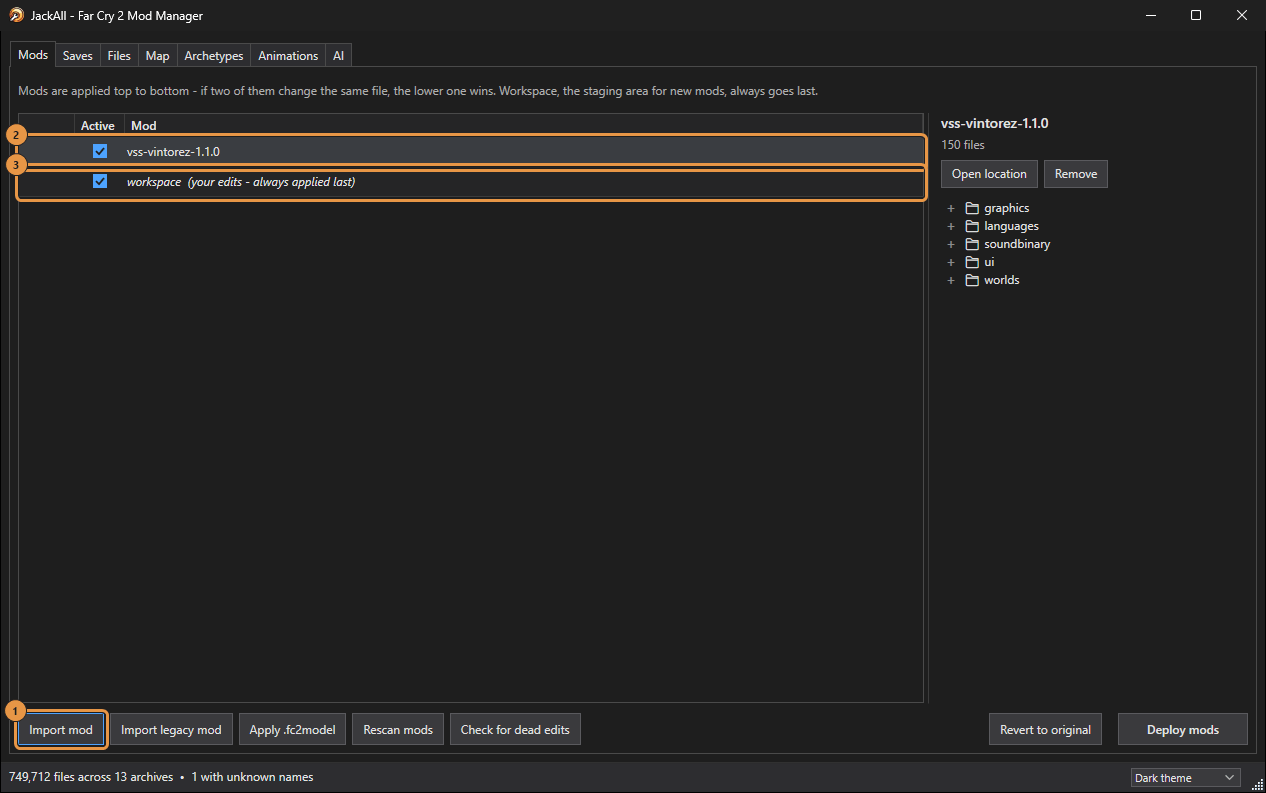
There's always a row called workspace at the bottom (3). That's where your own edits go if you ever make any. Leave it alone.
If you have more than one mod, the order only matters when two of them replace the same file or set the same value differently: the one lower in the list wins, and JackAll lists every such conflict after the deploy. See Load order, conflicts and plugins. Sound Overhaul and VSS Vintorez both ship the Dart Rifle's shot sound, so put VSS Vintorez below Sound Overhaul to hear the VSS's own shot.
4. Deploy
Click Deploy mods (1). It takes a few seconds, sometimes up to a minute. When the status line at the bottom says Built patch.dat (2), the mod is in the game. You can close JackAll now, the game doesn't need it running.

Deploy mods runs the same patch builder that installed VSS Vintorez, Flashlight and Sky Overhaul for their in-game tests.
The first time you deploy, JackAll saves a copy of the original files as patch.dat.vanilla and
patch.fat.vanilla in the game's Data_Win32 folder. Never delete those, they are how JackAll gets
your clean game back.
Every time you change something in the Mods tab (add, remove, tick, untick, reorder), click Deploy mods again. Nothing reaches the game until you do.
5. If the mod needs FCSE
Some mods are not only new files but also change how the game engine itself works. Those need FCSE, and their Nexus page lists it under requirements. Sky Overhaul and Sound Overhaul need it, VSS Vintorez doesn't. If your mod needs it, do the FCSE part below once, then come back. If it doesn't, start the game the way you always do.
Updating a mod
- Download the new zip.
- In JackAll, select the old one in the Mods tab and click Remove.
- Import mod the new zip, then Deploy mods.
Read the mod's changelog on Nexus too. Sometimes an update asks you to delete a settings file once.
Removing mods
- One mod: untick it, or select it and click Remove, then Deploy mods.
- Everything: click Revert to original and confirm. The game gets its original files back
and every FCSE plugin JackAll installed is taken out of
bin\plugins\. Your mod list stays in JackAll, so you can deploy it again later.

When the Nexus button arrives and you want to move to Vortex, click Revert to original in JackAll first, then install the mods again through Vortex.
FCSE and plugins
Far Cry 2's game files only go so far. A lot of what the game does is compiled into the engine
itself (Dunia.dll), and a normal mod can't change that. FCSE (Far Cry Script Extender) is a
second way to start the game: it starts Far Cry 2 exactly as usual, but first loads plugins from
the bin\plugins\ folder. A plugin is a .dll or a .lua file that changes the running game, for
example draws a new sky or turns on the game's own reverb. Nothing in the game folder gets
overwritten, and when you start the game without FCSE, the plugins simply don't load.
A plugin only runs when you start the game with FCSE.exe. Start it from Steam's Play
button or with FarCry2.exe and the plugin parts of your mods do nothing.
Install FCSE
You do this once.
- Download
fcse-<version>.zipfrom FCSE's Nexus page. - Open the zip and copy
FCSE.exeinto the game'sbin\folder, next toFarCry2.exe. Don't replace or renameFarCry2.exe, FCSE needs it. - Start the game by double clicking
bin\FCSE.exe. For a desktop shortcut, right click it → Show more options → Send to → Desktop (create shortcut). If you have the Steam version, have Steam running.
FCSE itself can't go into JackAll's mod list. It's one exe, so you copy it by hand like above.
Install plugins
Plugins that come inside a JackAll mod install themselves. A mod zip with a plugins\ folder
in it, like Sky Overhaul and Sound Overhaul, puts its plugin into bin\plugins\ when you click
Deploy mods, and takes it out again when you remove the mod and deploy, or click Revert to
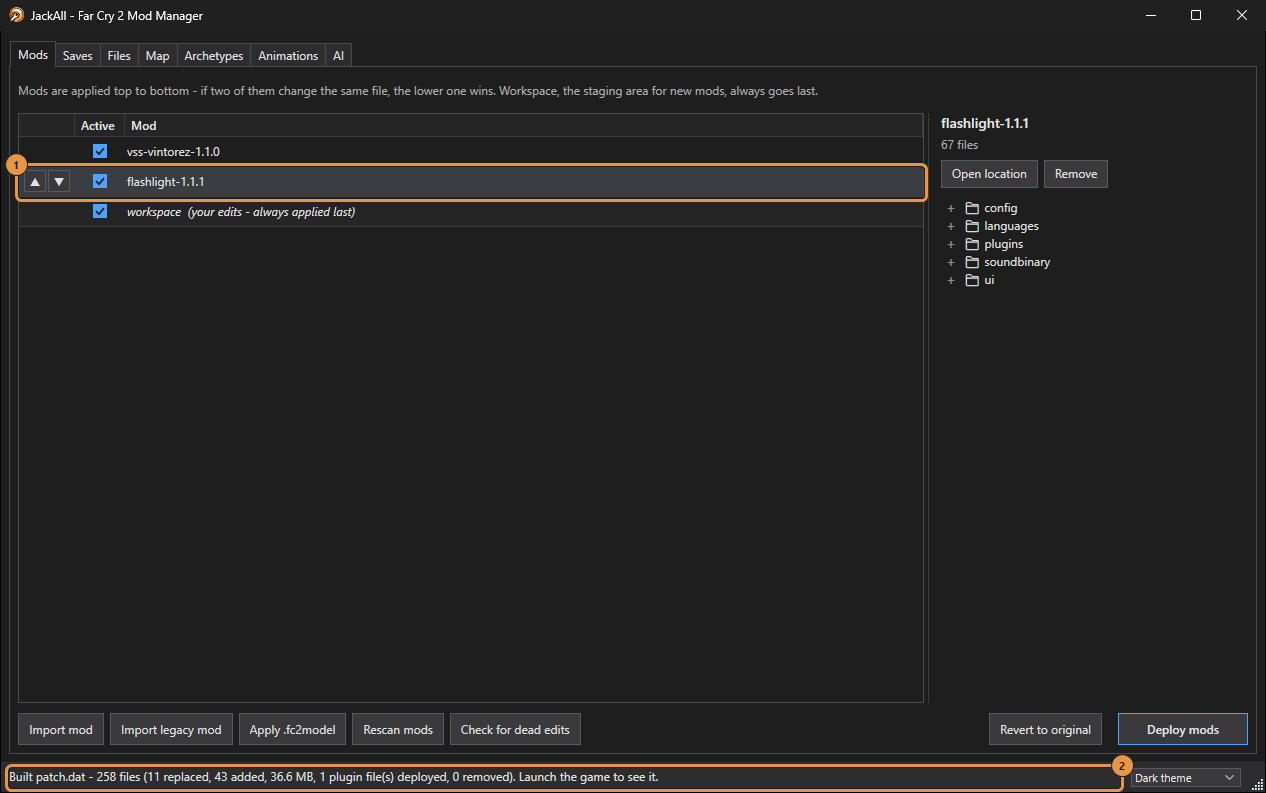
original. You don't copy anything. The status line counts the plugin files it deployed (2); here
it's Flashlight (1), which brings one.
A zip that only has a plugins\ folder works the same way: Import mod it in JackAll and
deploy. You can also install one by hand: copy what's inside its plugins\ folder into the game's
bin\plugins\ (make the folder if it isn't there yet). To uninstall a hand-copied plugin, delete
it from bin\plugins\ again. JackAll never touches files it didn't put there itself.
Did it work?
- In the game, Options has a Mod Configuration Menu button. If it's there, FCSE is running. Plugins that have settings show them there.
- Every launch writes
bin\fcse.log. It lists every plugin FCSE found and loaded, and what went wrong if one didn't. If you ask for help, attach this file. - Plugin settings are saved in
bin\fcse.ini. Some plugins keep their own file next to it, likebin\sky-overhaul.ini.
Removing FCSE
Delete bin\FCSE.exe and start the game with FarCry2.exe again. Remove the mods that need it
first (see Removing mods), because their plugin parts won't run without it.
Something went wrong
- "Import mod" says the zip has no files this game recognises. It's not this kind of mod. A
mod that comes with its own
patch.datandpatch.fatgoes in with Import legacy mod instead. A zip withFCSE.exein it is FCSE itself, see Install FCSE. - The mod does nothing in game. Did you click Deploy mods after adding it? Does the mod need
FCSE, and did you start the game with
FCSE.exe? A mod that changes weapons, prices or other game values may also need a new game, because a save keeps the values it was made with. - Deploy failed. The game is untouched: JackAll only swaps the new files in once they are complete. Close the game if it's running and try again. If it keeps failing, report it with the error text.
- No Mod Configuration Menu in Options. The game was started without FCSE. Start it with
bin\FCSE.exe. - You moved or deleted the mod zip. Remove it from the list, put the zip somewhere permanent, Import mod it again and deploy.