Import an old patch.dat mod
Most Far Cry 2 mods on Nexus ship a whole patch.dat and patch.fat, to copy over the game's own.
That replaces every other mod's patch too, so two of them can't be used together. Import legacy
mod compares such a mod with your install's base game and keeps only what differs, as edits in
your workspace that merge with other mods.
The example is scubrah's Skip Intro from Nexus. A new game starts at the hotel in Pala, without the taxi ride.
No mod imported this way has been played yet.
Import
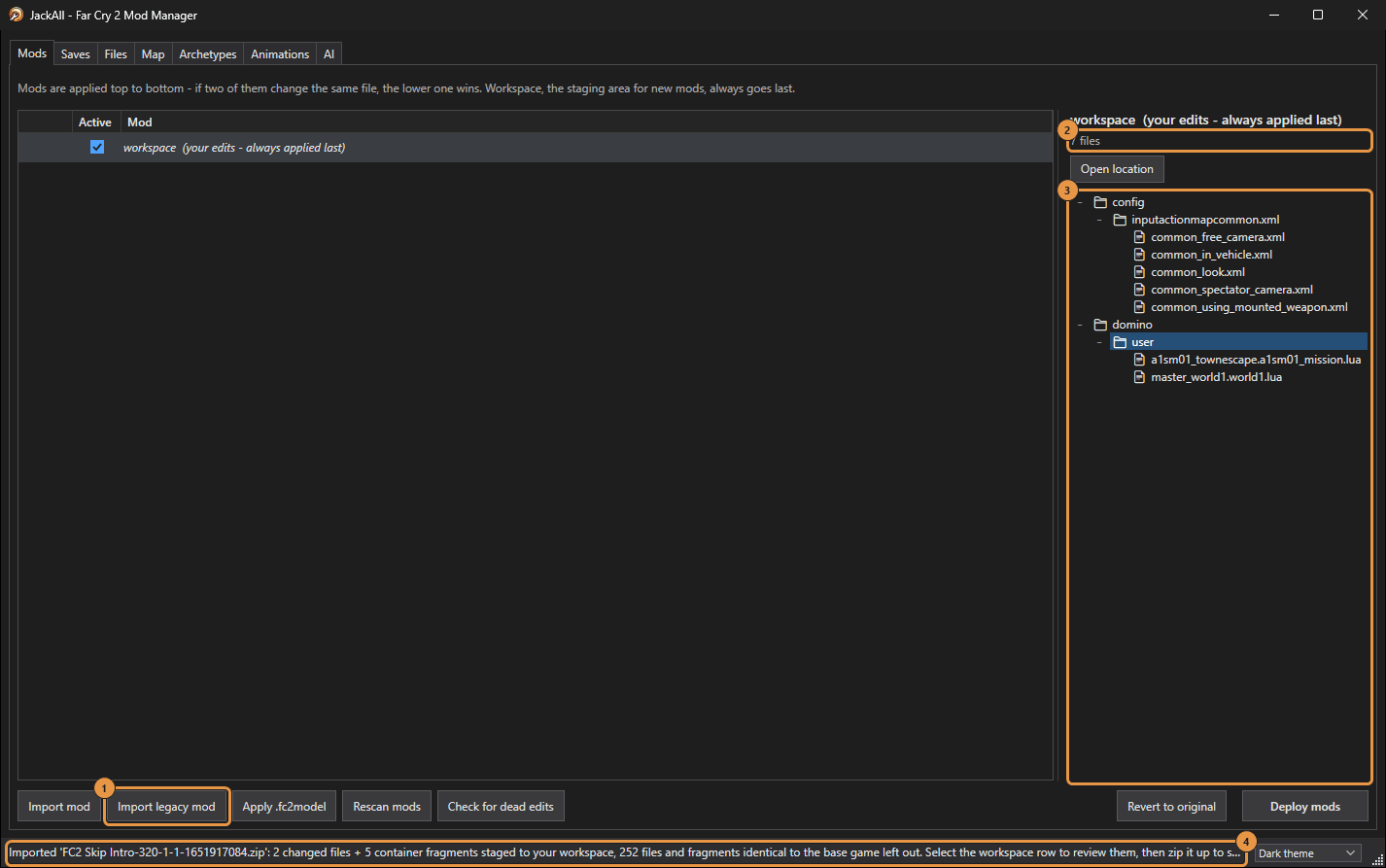
On the Mods tab, click Import legacy mod (1) and pick the mod's .zip. It doesn't matter
where in the zip patch.dat and patch.fat sit. The import doesn't add a row to the list; it
stages the changes into your workspace (2) and lists them on the right (3). The status line
(4) counts them.
A file that splits into pieces, like an entity library or an input map, comes in as only the pieces the mod changed (see Containers and fragments).
Old mods often copy an archetype into the patch override,
generated\entitylibrarypatchoverride.fcb, to change a few of its values. Such a copy comes in as
those values, in the world libraries the game would otherwise read it from, so it merges with mods
that edit them there. A copy of a DLC archetype is left behind, since the DLC library loads after the
override and the game never read it. An archetype no other library declares stays in the override;
on GOG, which ships no override, those come in as one whole file. What a copying tool changes on its
own, such as a float written back with fewer digits, an embedded rml document wrapped in an extra
<rml>, or the entity id of the library the copy came from, doesn't count as a change.
Up to three notices can follow:
- files the import could only take whole, which don't merge: each replaces other mods' whole copies of it;
- changes a piece can't express, which are left out;
- content the game never reads, which is left behind: a declaration that a later one of the same
name replaces, or a file no engine code path loads, such as a world's
entitylibrary_full.fcb.
Skip Intro brings none of these.
Check what came in
A legacy patch.dat is the whole patch of the game the author had, with the mod's changes in it.
The import leaves out everything that matches your install's patch or Steam's 1.03 patch. That's
why Skip Intro, built on Steam, comes in as its own seven files on this GOG install: the two
mission scripts in domino\user\ and the mouse filter in five action maps of
config\inputactionmapcommon.xml.
A mod built on any other patch, such as GOG's when you import it on Steam, brings the differences between the two patches along as if the mod had made them. Deployed as they are, they would replace your version of every one of those files. Read through the workspace before you deploy: Open location opens the workspace folder; delete what isn't the mod's, then click Rescan mods.
A mod's description usually says what it changes. To see every change with its exact place, use the command line; see Take features out of an old mod.
Look at a change
On the Files tab, tick Show only mod files (1) and pick master_world1.world1.lua (2), the
graph that starts a new game. The details show only the changed lines, with a little context.
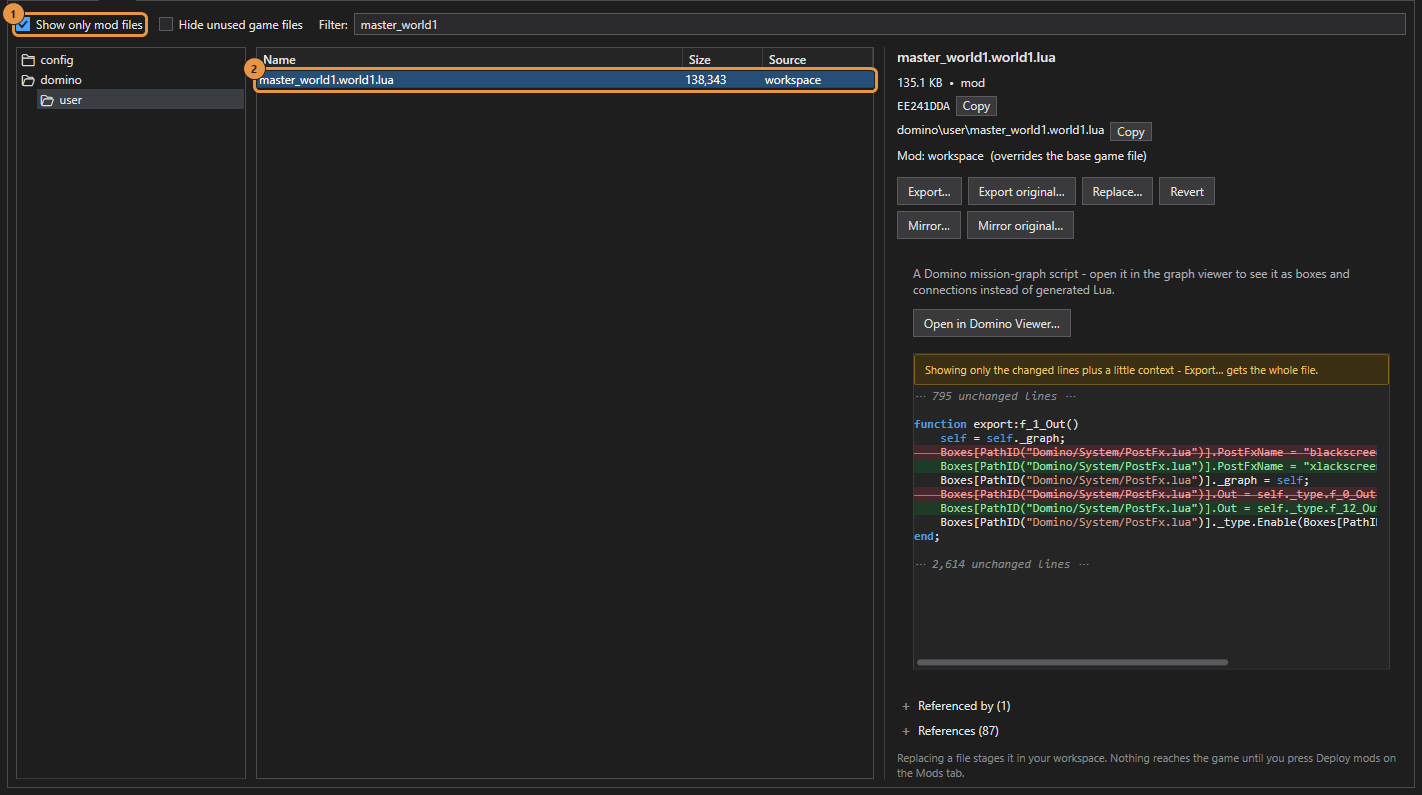
On a new game, the vanilla graph blacks the screen out with blackscreenfx and goes on to the taxi
ride, which fades it back in. Skip Intro misspells the effect as xlackscreenfx, so the screen
stays clear, and sends the graph straight to the town escape mission (f_12_Out). Open in
Domino Viewer… shows the same script as a graph; see Read a mission.
Then Deploy mods. To pass the result on, zip the workspace the way Share a mod shows.