Load order, conflicts and plugins
With one mod there's nothing to manage. With five, you start asking which one wins, what happens when two of them touch the same weapon, and why a mod you just installed does nothing. This page answers those, using two tiny test mods that both change the AK-47's magazine: one to 40 rounds, one to 50.
Deploy mods runs the same patch builder that installed VSS Vintorez, Flashlight and Sky Overhaul for their in-game tests. The 40 and 50 round test mods themselves haven't been played.
The mod list
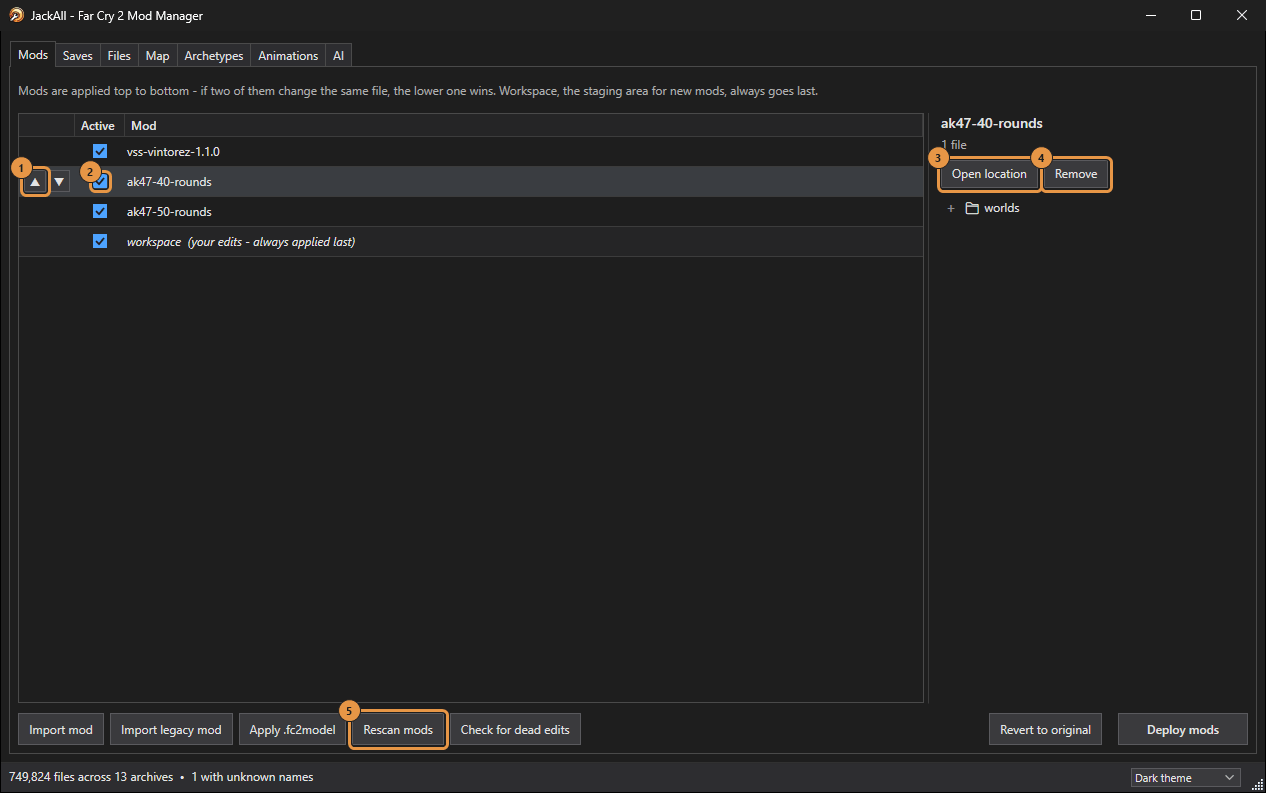
- Order. Mods apply from top to bottom. Select a mod and its arrows appear (1): move it up or down. The workspace, your own edits, is always last, so your work beats every mod.
- Active (2) switches a mod off without forgetting it. Untick it, deploy, and the game is as if the mod was never there.
- Open location (3) opens the folder the mod's zip is in. For the workspace row, it opens the workspace folder itself.
- Remove (4) takes the mod off the list. The zip stays where it is on your disk.
- Rescan mods (5) reads every zip and the workspace folder again. Use it after you replaced a zip or edited a file in the workspace with another program.
Nothing on this tab reaches the game until you click Deploy mods.
How two mods combine
It depends on what they change.
A whole file, such as a texture or a sound, is either one mod's or the other's. The lower mod in the list wins, and the higher one's version of that file is simply not used.
A value inside an entity, like the magazine above, is kept per entity. JackAll compares each mod with the original game and combines the differences:
- Two mods that change different entities never meet.
- Two mods that change different fields of the same entity, say one changes the AK-47's magazine and the other its damage, are merged. You get both changes.
- Two mods that change the same field to different values are a real conflict. The lower mod's value wins that field, and JackAll tells you about it after the deploy.
Entities aren't the only files kept in pieces. Which files are, and how to make your mod work next to others, is on Containers and fragments.
When two mods conflict
Click Deploy mods with both test mods ticked, and the deploy goes through. A window then lists
every conflict: which mod won, which one lost, the entity file and the exact field, here
…/Ammo/iAmmoInClip. The text can be selected and copied, to paste into a bug report. The
50-round mod is lower in the list, so the AK-47 holds 50 rounds. To get the other value, move the
other mod lower and deploy again.
To keep both mods ticked and pick the value yourself, set the field in your own workspace, for example on the Archetypes tab. Your workspace's value settles the conflict, and the rest of both mods still applies. A workspace edit that leaves that field alone doesn't settle it.
Stop on conflicts
Tick Stop on conflicts, next to Deploy mods, to have the deploy stop at a conflict instead. The message names both mods, the entity file and the field, and the order of the mods doesn't help.

Your game is not touched when this happens. The new archive is built in a temporary file and only swapped in when it's complete.
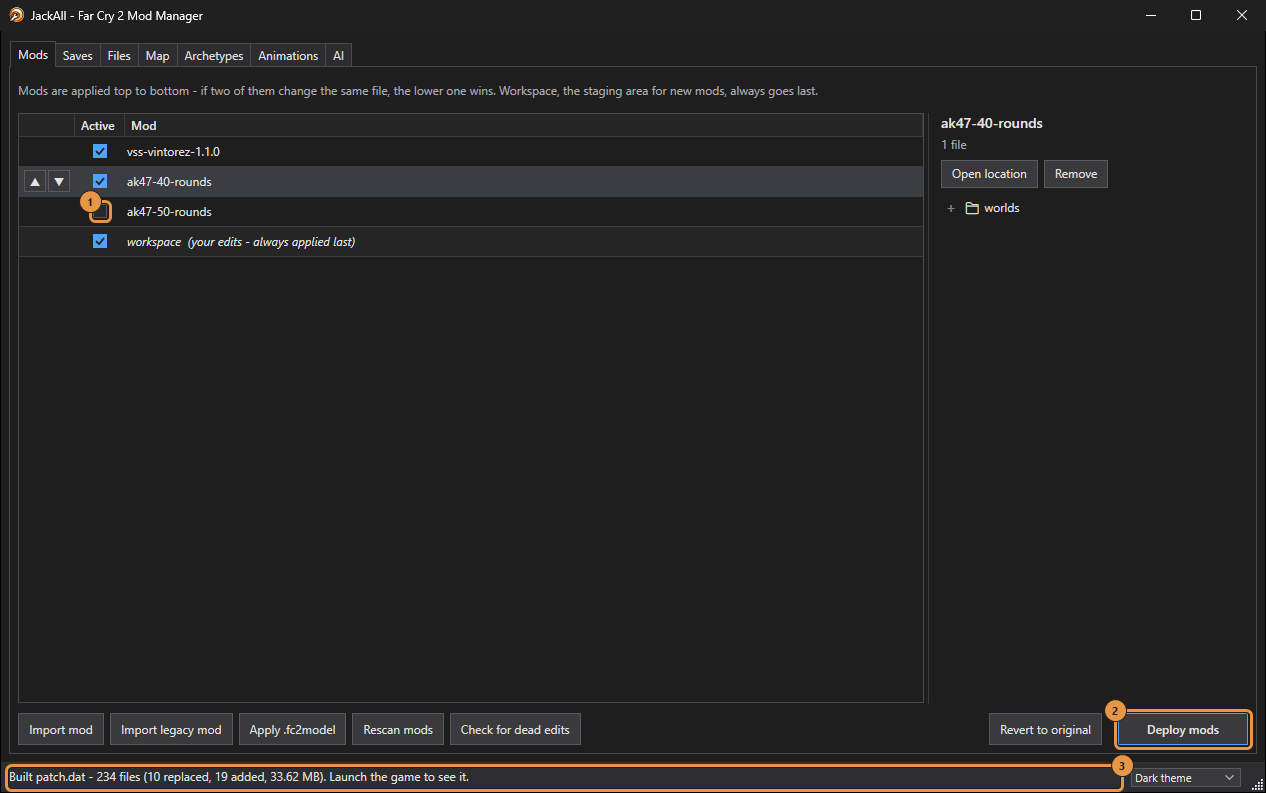
To fix it, decide which value you want and untick the other mod (1). Deploy again (2), and the status line says Built patch.dat (3). A value set in your workspace settles it too.
Plugins
A mod can bring an FCSE plugin in a plugins\ folder. Deploy mods copies it into the game's
bin\plugins\, and removing the mod (or Revert to original) takes it out again. JackAll keeps
a list of the plugin files it put there and never deletes anything else, so plugins you copied in by
hand stay where they are.
One case to know about: if you already copied a plugin by hand to the exact path a mod wants to put its own, JackAll leaves your file alone, skips the mod's, and says so when the deploy finishes. Delete the hand-copied one and deploy again. Installing FCSE itself is covered in Installing mods with JackAll.
A mod that does nothing
Go through these in order:
- Is the mod ticked, and did you click Deploy mods after the last change?
- Does a mod lower in the list replace the same file?
- Does it change weapon or other entity values? Start a new game. A save keeps many of the values it was made with.
- Click Check for dead edits. It finds edits to an archetype the game doesn't read, because another library declares the same archetype again and wins.
- Does it need FCSE, and did you start the game with
FCSE.exe?