Replace music and speech
Music and spoken lines are long sounds, so the game streams them from .sbao files instead of
keeping them in sound banks. Each one is a short header and an Ogg Vorbis track. JackAll plays them,
exports them as Ogg or MP3, and imports whatever audio you have.
The example is the English main menu theme, soundbinary\004b177b.sbao.
The import builds the file the way the format is understood, at the rate the game expects. A replaced track hasn't been heard in game yet.
1. Find and listen
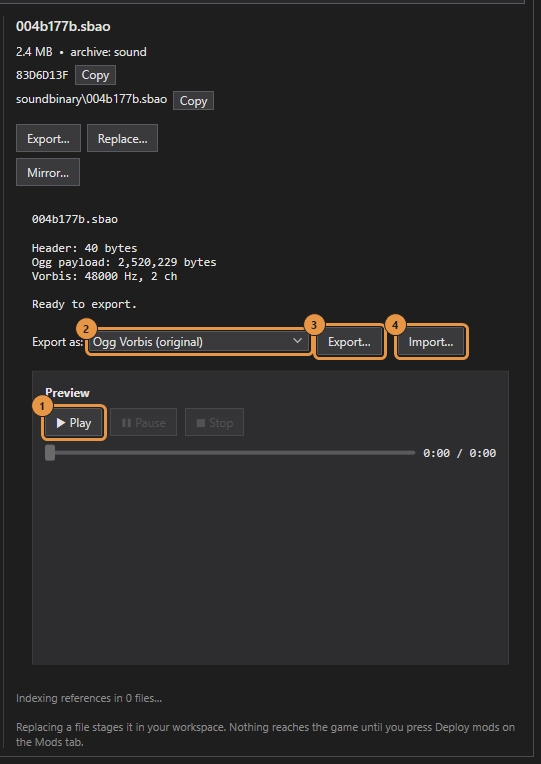
Sound files have numbers, not names. Search for ext:sbao on the Files tab and use ▶ Play
(1) to listen; the main menu theme is 004b177b.
2. Export the original
Pick a format (2), Ogg Vorbis (original) for the exact track or MP3 for something every player opens, and click Export… (3). Keep it if you want to edit the original instead of replacing it.
3. Import your own
Click Import… (4) and pick your audio file. Nearly every format works (MP3, WAV, FLAC, Ogg, M4A), because JackAll comes with ffmpeg and converts it to what the game wants: Ogg Vorbis at 48 kHz, stereo. You don't have to resample anything first.
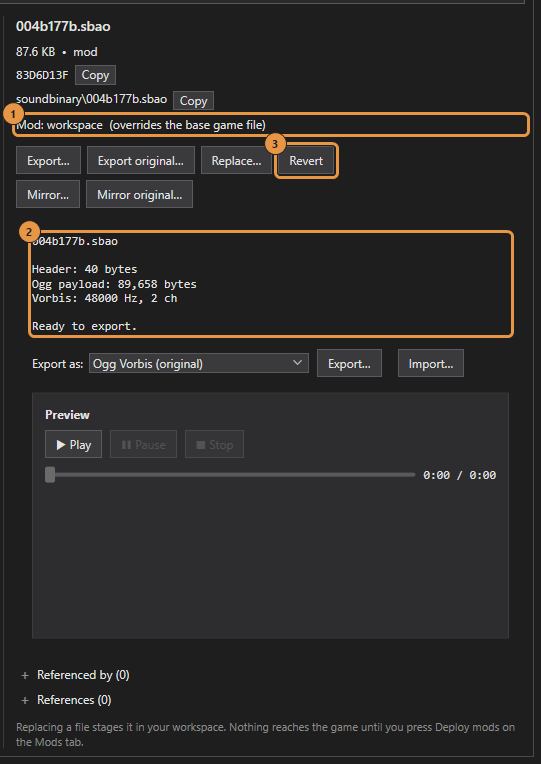
The file is staged in your workspace (1). The details show what's in it now (2), and Revert (3) gives you the original back.
Then Deploy mods, and the menu plays your track.
Speech
Dialogue works the same way: each line is its own .sbao. Its subtitle is a separate string in the
game's text table, keyed by the sound's number, so if you change what a line says, change its
subtitle too. See Rename a weapon for how to change game text.