Rename a weapon: HUD name and game text
A weapon's name lives in two places, and a rename that only touches one of them looks half done:
- The HUD shows
sDisplayNamefrom the weapon's properties. It's plain text, right in the archetype. - Everything else (the weapon shop, the operation and repair manuals, the item list, the
challenges, the statistics) looks a string up in the game's text table,
languages\<language>\oasisstrings.rml.
This page renames the AK-47 to "AK-47 Drum" in both.
VSS Vintorez renames the Dart Rifle in exactly these two places, and was played.
1. The HUD name
On the Archetypes tab, open WeaponProperties.Primary.AK47 in world1 the same way as in
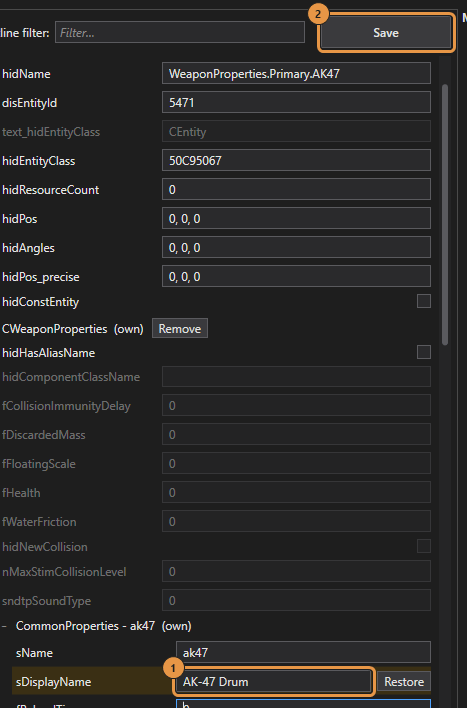
Your first mod. Under CWeaponProperties ▸ CommonProperties, set
sDisplayName to AK-47 Drum (1) and Save (2). Then do the same in world2.
2. Find the strings
On the Files tab, open languages\english and select oasisstrings.rml. Click Export XML…,
open the file in any text editor and search for the old name. For the AK-47 there are nine strings,
in five sections:
| Section | String id | English text |
|---|---|---|
WeaponBazaar | WEAPONBAZAAR_AK47_CRATE_NAME | AK-47 |
WeaponBazaar | WEAPONBAZAAR_AK47_OPERATION_MANUAL_NAME | AK-47 |
WeaponBazaar | WEAPONBAZAAR_AK47_REPAIR_MANUAL_NAME | AK-47 |
Tutorial | WEAPONBAZAAR_AK47_CRATE_NAME | AK-47 |
Items | ak47 | AK-47 |
Challenges | ak47 | AK-47 |
StatisticService | Executions_ak47 | AK-47 Executions |
StatisticService | Kills_ak47 | AK-47 Kills |
StatisticService | Headshots_ak47 | AK-47 Headshots |
3. Don't import the whole table
The obvious next step, editing the exported XML and using Import XML…, is refused.

That's on purpose. The table holds every text in the game, almost a megabyte of it. If your mod carried the whole table, it would also carry the original of every string you didn't touch, and wipe out any other mod that translates or renames something else. So a mod states only the strings it changes, in a small file next to the table.
4. Write the fragment
Open your workspace folder (Mods tab, workspace row, Open location) and create
mods\languages\english\oasisstrings.fragment.xml:
<oasisstrings>
  <section name="WeaponBazaar">
    <string enum="WEAPONBAZAAR_AK47_CRATE_NAME" value="AK-47 Drum" />
    <string enum="WEAPONBAZAAR_AK47_OPERATION_MANUAL_NAME" value="AK-47 Drum" />
    <string enum="WEAPONBAZAAR_AK47_REPAIR_MANUAL_NAME" value="AK-47 Drum" />
  </section>
  <section name="Tutorial">
    <string enum="WEAPONBAZAAR_AK47_CRATE_NAME" value="AK-47 Drum" />
  </section>
  <section name="Items">
    <string enum="ak47" value="AK-47 Drum" />
  </section>
  <section name="Challenges">
    <string enum="ak47" value="AK-47 Drum" />
  </section>
  <section name="StatisticService">
    <string enum="Executions_ak47" value="AK-47 Drum Executions" />
    <string enum="Kills_ak47" value="AK-47 Drum Kills" />
    <string enum="Headshots_ak47" value="AK-47 Drum Headshots" />
  </section>
</oasisstrings>
Each <section> and enum has to match the table exactly; the value is your text. Save it as
UTF-8. Notepad does that by default.
5. Rescan
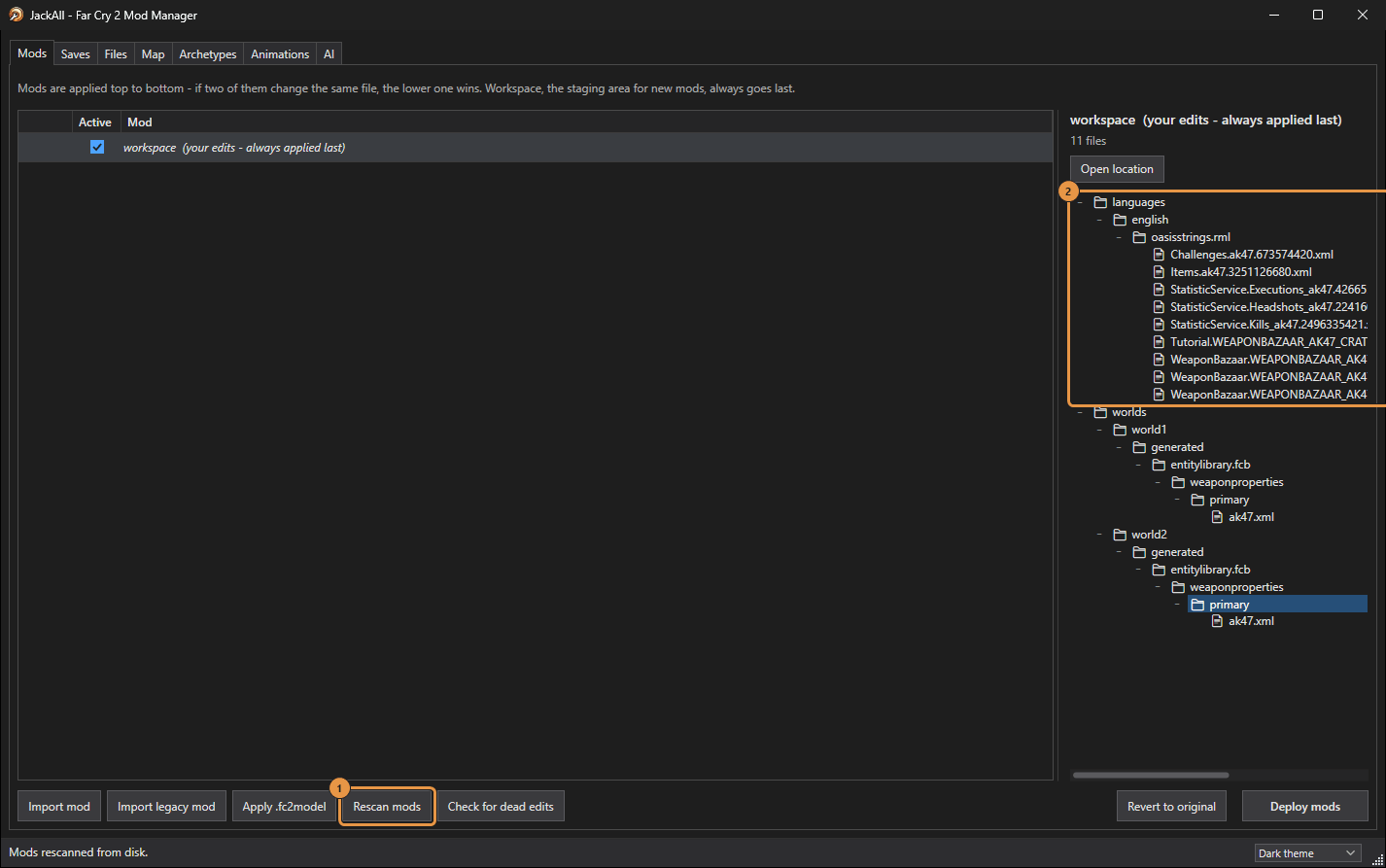
JackAll doesn't watch the workspace folder, so tell it you changed something: click Rescan mods (1). The workspace now lists one piece per string (2). Two mods that rename different strings never meet, even in the same section.
6. Check the result
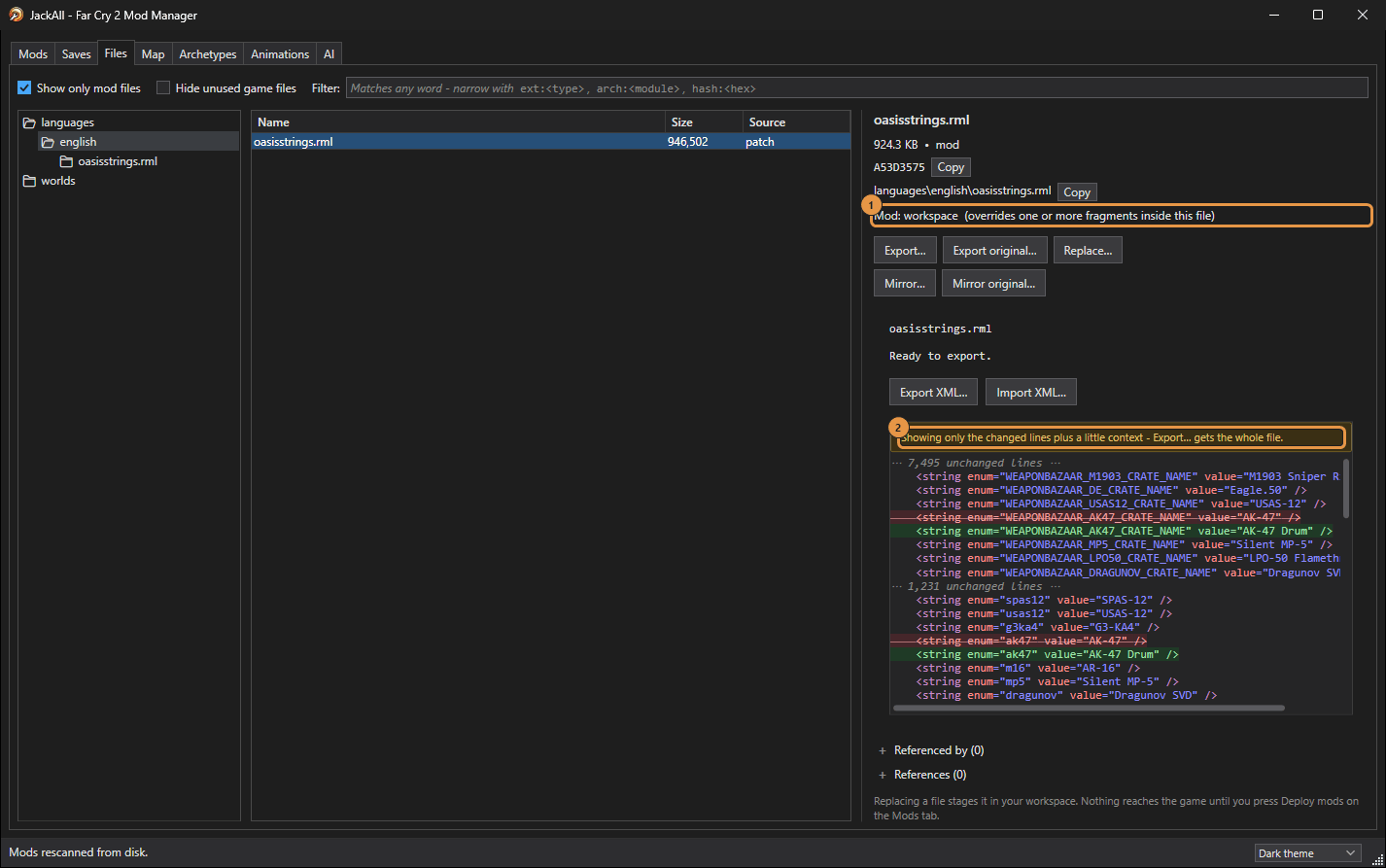
On the Files tab, tick Show only mod files and select languages\english\oasisstrings.rml.
It's marked as changed by your workspace (1), and the preview shows only the lines that differ, old
in red and new in green (2).
Then Deploy mods.
Other languages
The game ships eleven languages, each with its own table, and a player sees the one their game runs
in. A fragment for English changes nothing in German. For a complete rename, write one fragment per
language folder under mods\languages\. Keep the name itself as it is (it's a proper noun), but
check the strings around it: some languages bend a weapon's name to fit the sentence.
Replacing a weapon shows how VSS Vintorez handled that.