Replace a sound effect
Gunshots, footsteps, impacts and the like live in sound banks, .spk files under soundbinary\.
A bank isn't just audio: it also says how the sound plays, for example "pick one of these four at
random" or "fade out with distance like this". JackAll's sound bank editor shows that structure and
lets you change it.
The example is the Dart Rifle's first-person shot, soundbinary\004bf5e9.spk.
Replacing a record's audio is what VSS Vintorez does to this same bank, and that was played.
A random choice JackAll builds, as in the last step, gets new record ids. That kind of bank hasn't been played yet.
Finding the bank
A weapon names its sounds in its archetype, in fields starting with snd. The Dart Rifle's
sndSingleBulletShot is 0x004BF5EA, an event that only points on to 0x004BF5E9, and that one
is in soundbinary\004bf5e9.spk. JackAll follows that for you: both banks are labelled
weapon · single bullet shot (Dart Rifle), so tag:"dart rifle shot" in the Files tab's Filter finds
them (see Sound labels).
Replacing a weapon walks through every sound of a gun.
The bank
Select the bank on the Files tab. The editor shows its records as a tree (1): a Play record the game triggers, a Sample, and the Audio itself, with its channels, rate, codec and length. Select a record to see its settings under the tree. A Play record says what it Plays (2).
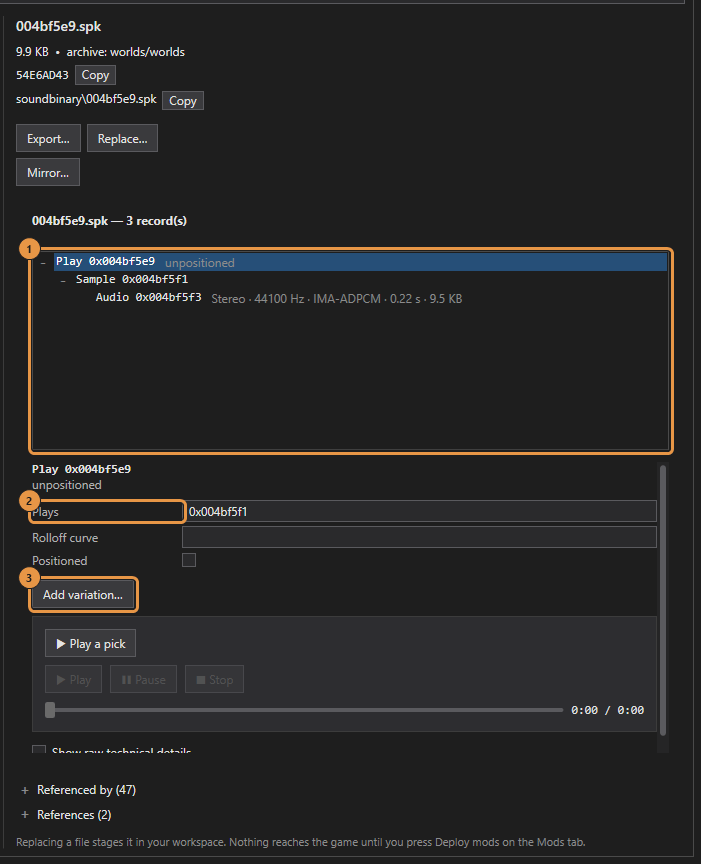
▶ Play a pick plays the sound the way the game would pick it: with several variations, a different one each time.
Replace the audio
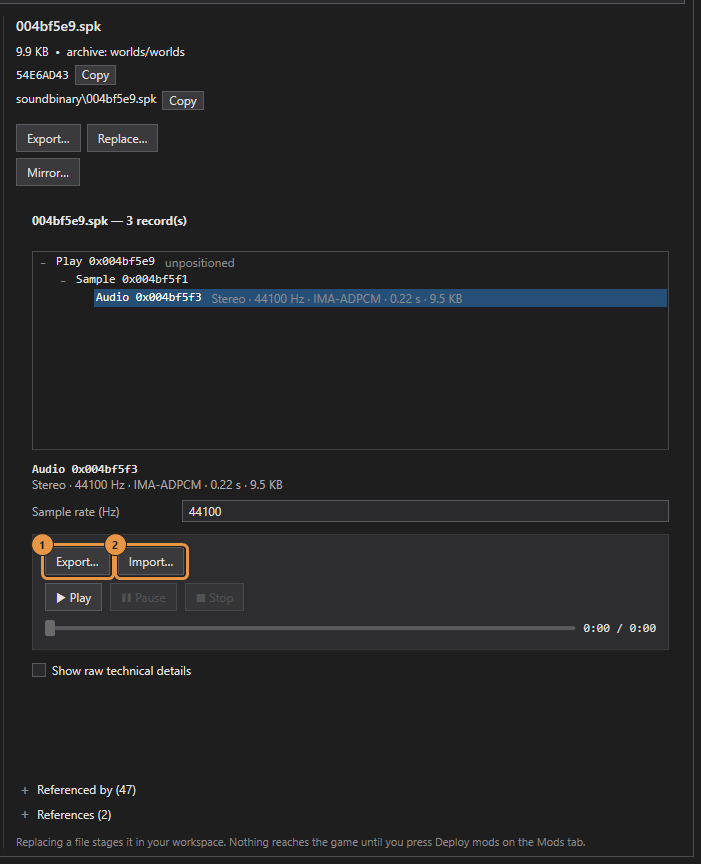
Select the Audio record. Export… (1) saves it as an ordinary audio file and Import… (2) replaces it. Import takes any format ffmpeg reads, which is nearly all of them: WAV, MP3, OGG, FLAC. JackAll converts it to the codec the record already uses.
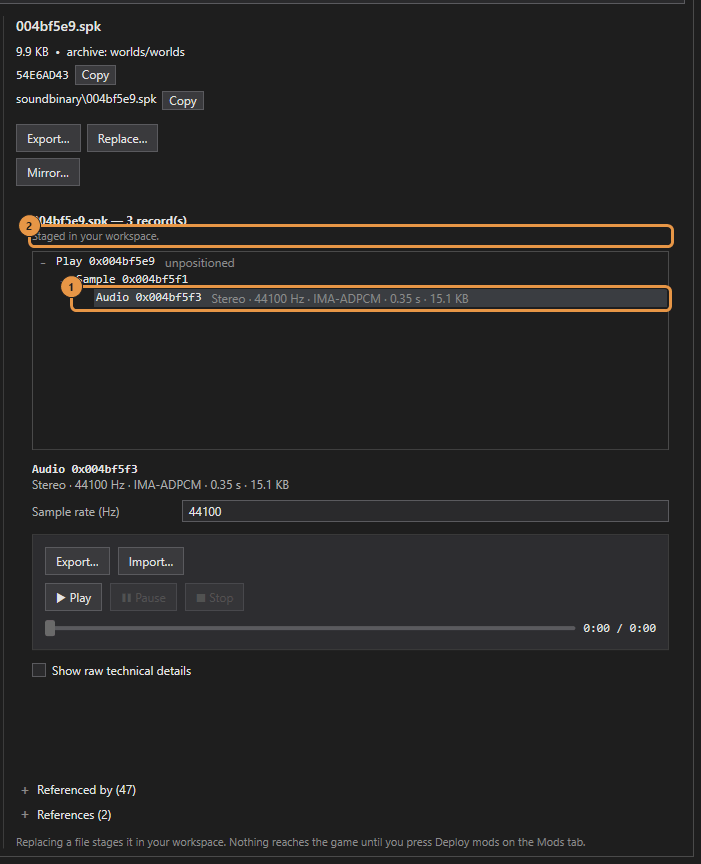
After the import the record shows your file's length (1), and the editor says the bank is staged in your workspace (2). There's no Save button: the editor stages the bank by itself once your edits settle, unless it found a problem, in which case a list of problems appears and nothing is staged until you fix them.
Add variations
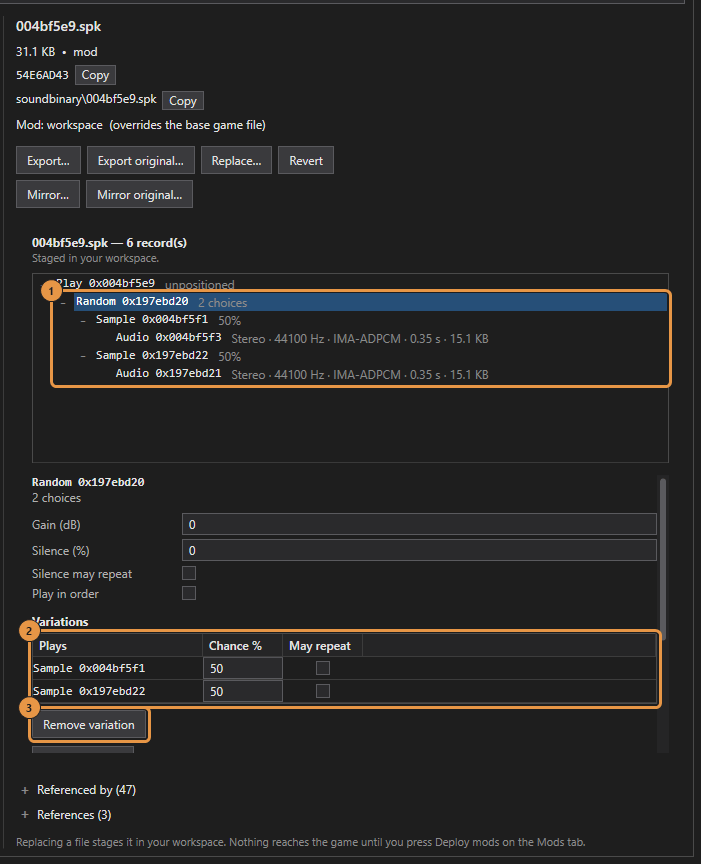
One gunshot played a thousand times sounds like a machine. Select the Play record and click Add variation…, then pick one or more audio files. JackAll turns the sound into a Random choice (1) between the old audio and the new: the Variations table (2) lists them with their Chance %, which you can change, and whether one may repeat. Remove variation (3) takes one out again.
Other settings
- A Play record that is Positioned sounds from where it happens in the world; the gun's own first-person sounds aren't positioned.
- A Rolloff curve decides how the volume falls with distance. Banks with curves show a chart you can edit point by point.
- A Switch record plays different things depending on a value the game sets. Its cases are listed under it, each with what it plays.
- Go to → follows a record that points into another bank.
- Show raw technical details shows every field, including the ones JackAll doesn't explain.
Then Deploy mods, and the next shot you fire uses your sound. The command line can do the same
with jackall-cli spk; see Editing sound banks.