The value editor in depth
Most of what people mod in Far Cry 2, weapons, vehicles, AI, prices, missions, is stored in .fcb
files. JackAll shows them in one editor, wherever you open them from:
- the Archetypes tab, on the definition the game reads (the usual way, see Which copy does the game read?);
- the Files tab, with Open value editor… on a piece of a split file;
- the Map tab, with Open in FCB editor on an object placed in the world;
- the Saves tab, on the values a savegame stores.
This page uses the AK-47's object archetype, weapons.Primary.AK47, in world1.
Saving here writes the same kind of entity file VSS Vintorez ships, which was played.
The layout
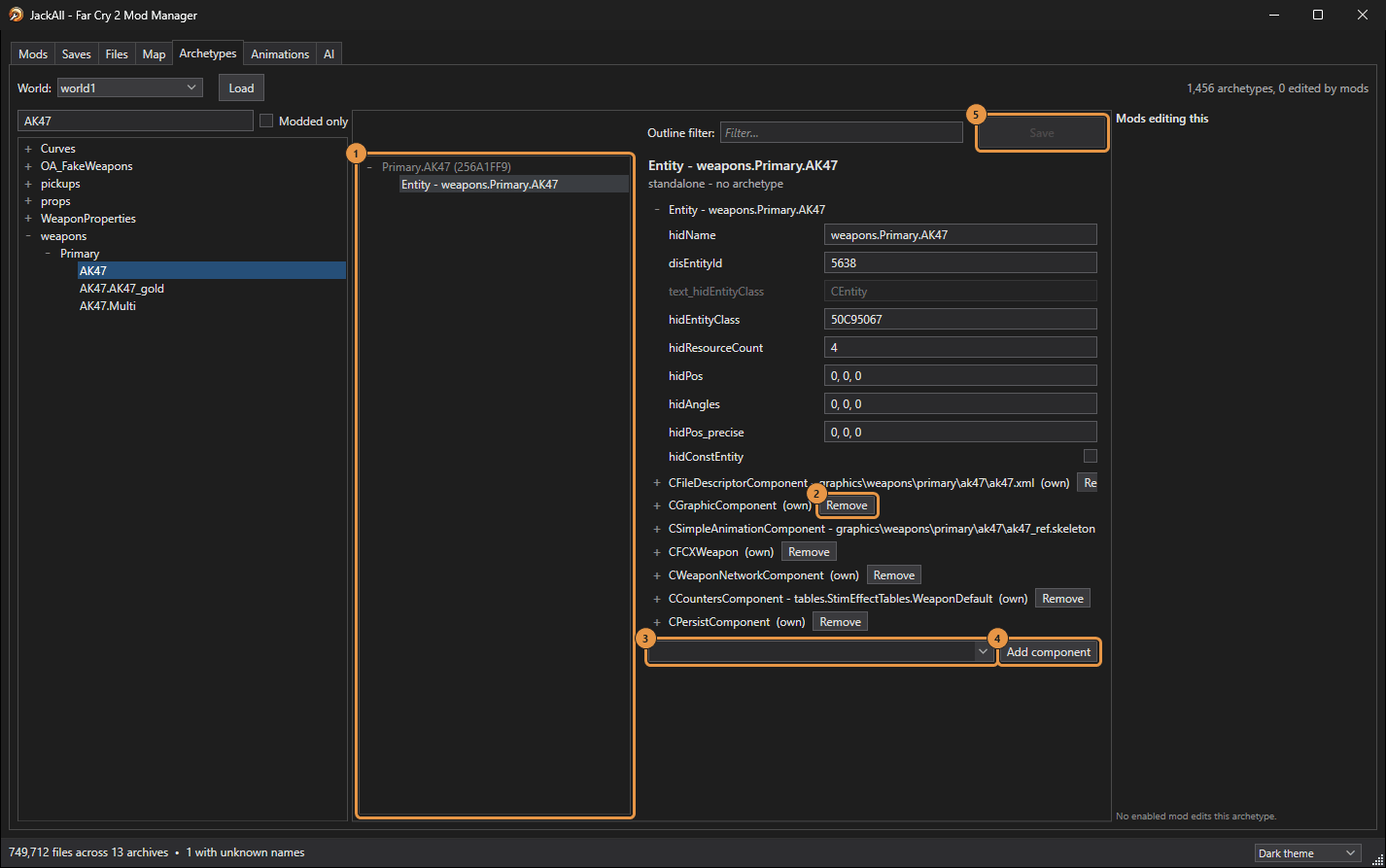
- The outline (1) lists the pieces of what you opened. An archetype is one entity, but a world sector or a savegame has thousands of rows, and the Outline filter above it finds one by name.
- An entity is made of components, one per job: its model, its animation, its sounds, its weapon behaviour. Each one opens with the +, and Remove (2) takes it off this entity.
- Add component (4) adds one picked from the list next to it (3). Its fields start at the engine's defaults.
- Save (5) writes the change into your workspace. It only lights up once something changed.
A changed field gets a highlight and a Restore button that puts the value back to what it was when you opened it.
Field types
Each field shows its real name and an editor that fits its type: a box for text and numbers, a
checkbox for yes/no, a drop-down for fields with named choices (they start with sel), x, y, z
for vectors, and eight hex digits for a hash.
Hashes need a word. The game rarely stores a file name or a name as text. It stores a number
computed from it. So the original editor saved the text right next to it, as a field named
text_… with the same name after the prefix. JackAll shows those in grey (1): they're notes, and the
game never reads them. The field it reads is the hash next to it (2).

To change a field that points at a file, don't type a hash. Click … (3).
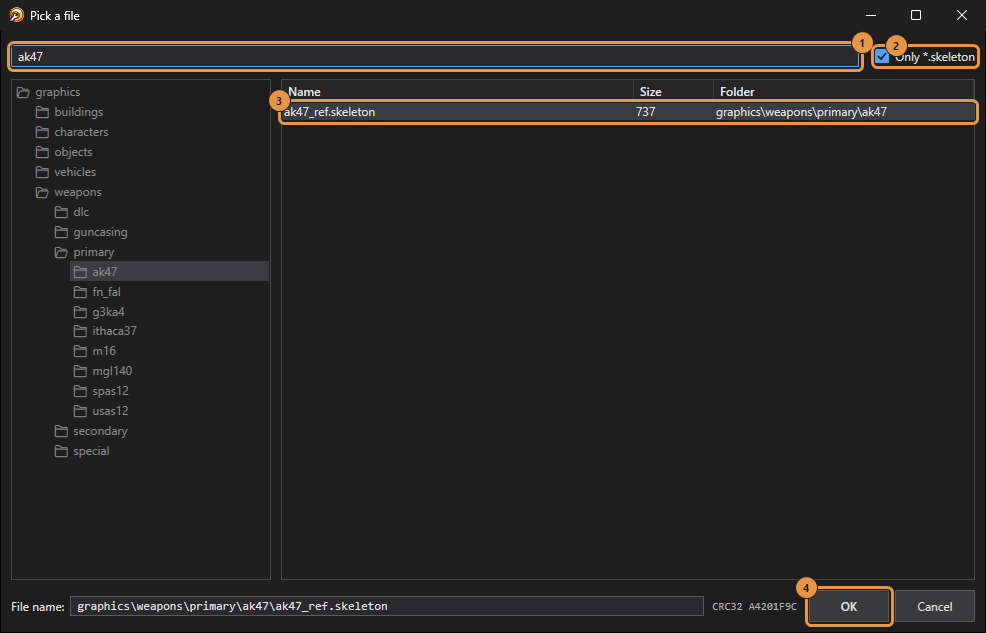
Pick a file
… opens a file picker over the game's files. Search for a name (1). When the field expects a certain type, Only *.skeleton (2) keeps just those. Pick the file (3): the box at the bottom shows its path and the hash it will write. Then click OK (4).
Lists
Some fields hold a list of values (1). + Add item (2) adds an entry, and the × next to an entry removes it.

When Save stays grey
Type something a field can't hold, such as letters into a number (1), and the field turns red. The editor counts the fields that need fixing (2), and Save (3) stays disabled until they're fixed, so a broken value never reaches your workspace. Restore puts the old value back.

Objects placed in a world
An object on the map, a particular car at a particular gas station, is an instance of an archetype: it keeps only the fields where it differs from it. Opened from the Map tab (see Explore a world), a field that the instance overrides has a Revert button, which removes the override so the archetype's value applies again.
Whole files
Some .fcb files aren't split into pieces. Their preview on the Files tab has Export XML…,
which turns the file into XML you can edit in any text editor, and Import XML…, which converts it
back and stages it in your workspace. The command line does the same with jackall-cli fcb decode
and fcb encode.